Why this update in KWT Spider 2.0 is worth a look?
If you've spent any time doing technical SEO, you already know the drill: you need to crawl a site, find out what's broken, and turn that into a list of fixes someone can actually act on. KWT Spider is one of them, and version 2.0 just shipped with some changes that are worth walking through — not as a sales pitch, but as a plain explanation of what's new, what it's good at, and where it has real limits.
What KWT Spider actually is?
KWT Spider is a desktop crawler for Windows. You install it, point it at a website (or a list of URLs, or a folder on your hard drive), and it goes through and collects data on every page it finds — status codes, titles, meta descriptions, headings, links, images, canonicals, and a long list of other technical details. Once the crawl finishes, that data gets organized into tabs you can dig through, filter, and export.
It's not a cloud platform. Everything runs locally on your machine, and your crawl data doesn't get uploaded anywhere unless you choose to export it. You don’t need to log in.
At its core, it does what most SEO crawlers do: find broken links, catch duplicate titles, flag missing meta descriptions, check canonicals, and generally answer the question "What's wrong with this site technically? The changes in 2.0 are mainly scaling, a new offline mode, and support for auditing pages for AI search tools—not a re-imagining of the basic idea.
What's new in version 2.0
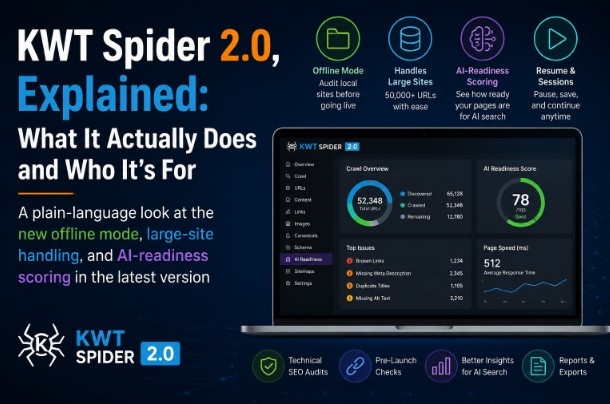
Offline (static folder) mode. This is the headline addition. Instead of crawling a live URL, you can point KWT Spider at a folder on your computer — say, a site you're about to deploy — and it'll crawl it like a live website, checking HTML, PHP, and ASP files for issues. This includes a new Broken Assets tab that flags pages that reference CSS, JS, images or favicons that really don't exist on disk. If you've ever pushed a site live only to discover a missing stylesheet, this is aimed squarely at that problem, and it lets you catch it before deployment rather than after.
Large-site handling. Version 2.0 moves to a SQLite-backed database for storing crawl data instead of keeping everything in memory. In practice, that means crawls of 50,000+ URLs are supposed to stay responsive — tabs load in pages rather than trying to render everything at once, and there's a live monitor during the crawl showing discovered/crawled/remaining counts so you're not staring at a blank screen. There's also a freeze watchdog meant to catch the kind of main-thread stalls that cause "Not Responding" freezes on big crawls.
Resume and sessions. You can pause a large crawl and pick it back up later, or save a completed crawl session and reopen it for analysis or export without re-crawling the site. If you've ever lost a two-hour crawl because your laptop went to sleep, this is a direct answer to that.
GEO / AI readiness scoring. This is the other big addition — a set of checks aimed at how well a page might get cited by AI answer engines like ChatGPT, Perplexity, or Google's AI Overviews. It's not part of a standard crawl; you turn it on in Configuration, and once enabled, each page gets scored (0–100) based on things like whether it has a clear definition near the top of the content, FAQ or Article schema, visible author and date info, and other EEAT-style trust signals. This is a reasonable attempt to translate “is this page written to be quoted by a model” into something you can audit page by page, as part of your regular SEO checks.
What you get when crawling a site?
Once a crawl runs, the results are organized into around 29 tabs, covering things like:
- Crawl status — every URL, its response code, redirect chains, and broken links
- Basic on-page elements – titles, meta descriptions, H1/H2 tags, thin content or duplicate content
- Technical structure — canonicals, pagination, robots directives, hreflang, query parameters
- Assets and scripts — images with missing alt text, oversized files, broken or slow-loading JS
- Schema and AI readiness — structured data validation and the GEO scoring mentioned above
- Site health and security — HTTPS status, mixed content, response times
Click into any individual URL and there's a detail panel with more forensic info — incoming and outgoing links for that specific page, raw HTML, HTTP headers, cookies, and a brief explanation of why that page might be considered a problem.
For getting the data out, you can export a single tab to CSV or Excel, generate a client-facing HTML issues report, or do a bulk export of everything at once. It'll also generate XML/HTML sitemaps and an llms.txt file, which is a newer convention some sites use to tell AI crawlers how to handle their content.
Where it fits, and where it doesn't
KWT Spider is a solid fit if you're doing regular technical SEO audits, especially if you work across multiple client sites and want everything running locally rather than in a browser tab or a shared cloud tool. The offline mode is genuinely useful if you or your dev team wants a pre-launch check before a site goes live. And if you're curious about how "AI-ready" your content is, the GEO scoring gives you something more concrete to work from than guesswork.
A few things worth knowing going in, so there are no surprises:
It's Windows-only. If you're on a Mac or Linux, you'd need a VM or a Windows machine to run it — there's no cloud or browser version.
You need to install it. It's not a hosted tool you log into; it's a desktop download, which is either a plus (your data stays local) or a minor hassle depending on how you like to work.
The demo version caps crawls at 250 URLs. That's plenty to get a feel for the tool on a small site, but anything larger will need the full license, which also unlocks exports, sitemap generation, session saving, and full GEO scoring — the demo shows GEO as a preview only.
Page Speed here isn't a Lighthouse score. It's based on crawl response timings, which is a decent proxy for triage across a whole site but isn't a substitute for a proper Core Web Vitals audit if you need exact performance numbers.
None of that makes it a bad tool — it just means it's built for a specific workflow (Windows desktop, local-first, full-site technical audits) rather than trying to be everything for everyone.
Bottom line
KWT Spider 2.0 is a technical SEO crawler that's added some genuinely practical upgrades: an offline mode for pre-launch checks, better handling of very large sites, session resuming so you don't lose progress, and a stab at scoring pages for AI-answer readiness. If your work involves regularly crawling sites for issues and you're comfortable running desktop software on Windows, it's worth a look — and since there's a free demo capped at 250 URLs, you can actually try it on a real site before deciding whether the full version is worth it for your workflow.