Protecting Recovery Data Through a More Resilient Backup Architecture
When business systems experience a major disruption, the availability of reliable recovery information can determine how quickly normal operations resume. Air Gap Backup Solutions help organizations strengthen their recovery architecture by separating selected backup copies from routine network connectivity. This separation can reduce exposure when security incidents affect production systems and connected recovery infrastructure.
For businesses that depend on databases, customer records, financial information, and operational applications, a well-designed recovery strategy should protect data while ensuring that authorized teams can restore it when necessary.
Why Conventional Backup Infrastructure Needs Careful Planning
Automated backups are an important part of modern IT operations. They allow organizations to copy information regularly, retain historical versions, and restore individual files or entire systems after failures.
However, backup repositories may share network connections, administrative accounts, or management tools with production environments.
If an attacker compromises a privileged account, those shared relationships can create opportunities to access recovery resources.
The objective is not to abandon automated backups. Instead, organizations can supplement convenient recovery copies with additional protection for information that must remain available during a serious incident.
Build a Recovery Architecture Around Business Risk
The first step is determining which information requires the strongest protection.
Organizations should assess datasets according to their business importance, sensitivity, rate of change, and recovery requirements.
Examples include:
- Customer and transaction databases
- Financial and accounting records
- Application configurations
- Business-critical documents
- Intellectual property
- Operational systems data
- Recovery credentials and documentation
Establish Recovery Priorities
A business should identify which systems need to be restored first and how much recent data it can afford to lose.
These requirements influence backup frequency, retention, storage capacity, and the placement of recovery copies.
A critical customer-facing application may require a different recovery strategy from an archive that is rarely accessed.
Create Multiple Layers of Protection
A resilient architecture uses different recovery mechanisms for different purposes.
A business might maintain:
Primary production data: Information used during daily operations.
Operational backups: Frequently accessible copies for routine restoration.
Secondary backups: Additional copies that provide redundancy.
Separated recovery copies: Information protected from ordinary production connectivity.
Long-term archives: Historical data retained for business or governance requirements.
This structure avoids relying entirely on a single backup repository.
How Controlled Separation Works
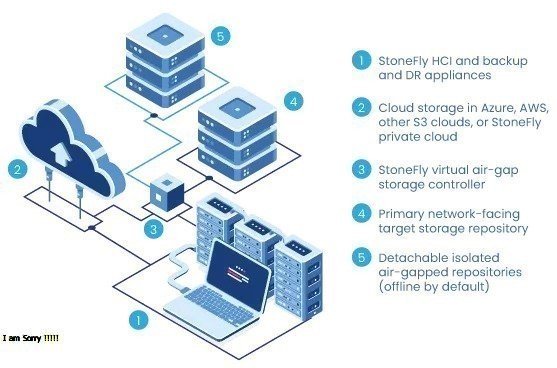
The defining feature of a separated recovery environment is that selected copies are not continuously exposed to normal production access.
Information can be transferred through an approved process, verified, and then placed behind a more restrictive access boundary.
A controlled workflow may include:
- Select the data that needs protection.
- Create a backup through an approved process.
- Verify completion and integrity.
- Transfer the information to the protected environment.
- Restrict or remove unnecessary connectivity.
- Record the transfer and relevant approvals.
- Test restoration periodically.
The implementation may involve dedicated disconnected infrastructure or other controlled isolation mechanisms, depending on organizational requirements.
Protect the Backup Management Layer
Storage separation is only one aspect of recovery security.
Backup management software, administrative credentials, and control systems can also represent important points of exposure.
Organizations should limit who can change retention policies, delete recovery copies, modify backup jobs, or connect to protected infrastructure.
Useful safeguards include dedicated administrative accounts, strong authentication, restricted privileges, activity logging, and regular access reviews.
Where practical, the management environment for protected recovery resources should be separated from ordinary production administration.
Verify the Quality of Protected Copies
A protected copy must be complete and usable.
Organizations should establish verification procedures that check whether backups contain the expected information and whether restoration is possible.
These procedures can include:
- Backup job validation
- Integrity checks
- File-level restoration tests
- Database recovery exercises
- Application-level recovery tests
- Review of recovery logs
Test Dependencies, Not Just Files
Applications often rely on more than their primary data.
Configuration files, authentication services, encryption keys, software versions, and network settings may also be necessary.
Recovery testing should identify these dependencies and ensure that the organization can restore the complete service rather than just retrieve isolated files.
Plan for Recovery Time and Data Loss
Recovery planning should establish realistic objectives.
The recovery time objective (RTO) describes how quickly a system should be restored. The recovery point objective (RPO) describes how much recent information can be lost without exceeding business tolerance.
These objectives help determine how frequently data should be copied and how quickly recovery information needs to be available.
For systems with strict recovery requirements, a combination of accessible backups and separated copies may be more appropriate than relying on only one type.
Control the Movement of Information
The process used to move data into a protected environment should be clearly documented.
Organizations should identify who can approve transfers, which datasets are permitted, and how information is validated before and after movement.
A robust procedure should address:
- Source verification
- Authorization
- Malware and integrity checks where appropriate
- Approved transfer methods
- Destination verification
- Audit records
- Handling of failed transfers
These controls help prevent a transfer process from becoming an uncontrolled route into the protected environment.
Maintain Capacity and Retention
Recovery copies consume storage capacity, particularly when organizations retain multiple versions or protect large datasets.
Capacity planning should account for source data, change rates, retention periods, the number of copies, and protection overhead.
Organizations should review retention policies regularly to ensure they remain appropriate for business requirements.
Old information should not be deleted solely to free space without checking whether it is still needed for recovery, historical reference, or applicable retention obligations.
Prepare for Physical and Operational Risks
Protected recovery infrastructure still depends on reliable facilities and documented operating procedures.
Organizations should consider physical access restrictions, equipment monitoring, hardware maintenance, and the secure handling of removable media.
They should also ensure that more than one qualified person understands the recovery process.
Documentation should cover access approval, backup updates, restoration, maintenance, escalation, and recovery verification.
Common Mistakes That Weaken Recovery Readiness
Treating Replication as the Only Protection
Replication can reproduce accidental deletion or unwanted modifications. Independent recovery copies may still be required.
Sharing Credentials Across Environments
Broadly shared credentials can make it easier for an incident in one environment to affect another.
Skipping Recovery Exercises
Successful backup jobs do not guarantee that complete restoration will work.
Allowing Uncontrolled Connections
Unnecessary connectivity can weaken the protection boundary around recovery information.
Ignoring Operational Ownership
Backup and recovery responsibilities should be clearly assigned rather than left to informal arrangements.
Integrate Recovery Protection With Incident Response
Recovery procedures should be connected to the organization's incident response plan.
During a security incident, teams may need to determine whether recovery copies are trustworthy before restoring systems. Restoring from a compromised or incomplete copy can reintroduce problems into the environment.
The recovery process should therefore include appropriate investigation, validation, prioritization, restoration, and post-recovery monitoring.
Conclusion
Air Gap Backup Solutions can help organizations create a more resilient recovery architecture by separating selected backup copies from ordinary production connectivity. This can reduce exposure when incidents affect connected systems and preserve additional options for restoring critical information.
Effective protection requires a complete operating model that includes access management, controlled transfers, backup verification, recovery objectives, capacity planning, documentation, and regular restoration exercises.
By combining separated copies with accessible backups and a tested incident response process, organizations can improve recovery readiness without sacrificing the practical requirements of day-to-day operations.
FAQs
1. What makes a separated recovery copy different from an ordinary backup?
A separated recovery copy is protected from routine network access through a deliberate isolation mechanism. This can reduce its exposure to incidents affecting connected production infrastructure.
2. How should an organization decide which systems receive this protection?
It should assess business impact, data sensitivity, recovery requirements, and the consequences of losing access to each dataset.
3. Why are administrative credentials important in recovery security?
Privileged credentials may allow users to modify backup settings, delete copies, or change access policies. Protecting these credentials helps reduce the risk of unauthorized changes.
4. Should restoration be tested using real application workflows?
Yes. Application-level tests can reveal missing configuration files, dependencies, or other issues that simple file retrieval tests may not identify.
5. How does recovery protection support incident response?
It can preserve additional recovery options, allowing teams to restore trusted information after investigating an incident and verifying that the selected recovery copies are suitable for use.