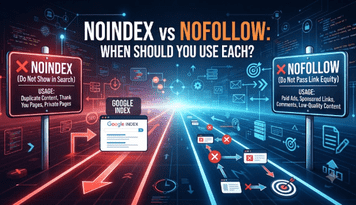
Noindex and Nofollow - These two directives are confused all the time, and it’s easy to see why — both sound like ways of telling search engines “don’t do something” with a page. But they govern very different things, and mixing them up can silently harm a site’s visibility. Here is how each one works in reality and when to choose one over another.
What Noindex Actually Does
Noindex is an instruction to search engines to not include a particular page in its index. A page with a noindex tag can be crawled but will not appear in search results, even if someone searches for the exact title.
It's typically implemented one of two ways:
- A meta tag in the html head of the page <meta name="robots" content="noindex">
- A HTTP header X-Robots-Tag: noindex for non-HTML files such as PDFs
- Noindex is a decision on the page level. It’s about whether or not a particular URL even deserves a place in search results at all.
What Nofollow Actually Does
Nofollow is for links, not for pages. A nofollow link instructs search engines not to pass any link equity through the link to the page it points to. The page being linked to can still be indexed by other means, the link itself just isn’t considered as an endorsement.
Nofollow is found in two places:
For single links: <a href="..." rel="nofollow">
- As a page-wide meta directive, <meta name="robots" content="nofollow">, which instructs search engines not to pass signal through any link on that page
- Google has also launched related attributes – rel="sponsored" for paid links and rel="ugc" for content created by users – such as blog comments – that function in a similar fashion but more accurately describe the source of the link.
The Core Difference
Noindex determines whether a page shows up in search results. Nofollow is used to control whether a link passes ranking value. A page can be indexed while having nofollow links on it. You can have a page that is noindexed but still has perfectly normal followed links pointing off it. They are independent environments that just happen to be located in the same part of a site’s technical setup.
When Noindex Makes Sense
Pages that exist for functional purposes but do nothing to improve search results should be set to noindex:
- Internal search results pages
- Thank-you pages or order confirmation pages
- Staged or duplicate content that cannot be easily canonicalized
- Automatically generated thin category or tag pages in a CMS
- Admin-only or account pages that are barely accessible publicly
The common thread is that these pages are there to serve a purpose for users or the site’s function, but ranking for them in search would either confuse visitors or dilute the site’s overall quality signal.
When Nofollow Makes Sense
Nofollow is more about protecting the flow of link equity, outbound or within a site:
- Paid or sponsored links that would violate search engine guidelines if passing ranking signal.
- Content created by users (such as comments or forum posts) where the site owner does not control what is linked to Login or account-action links that do not need to be crawled repeatedly
- Sometimes, a site wants to de-prioritize internal links, without blocking crawling altogether—but it’s used sparingly, as it can lead to crawl inefficiencies if overused.
A Common Mistake Worth Avoiding
A common mistake is to noindex a page and then link heavily to it throughout the site. Search engines will keep crawling it, keep spending crawl budget on it, and just not show it in results, which is often not what the site owner wanted if the real goal was to cut down on crawl attention altogether. In these cases, blocking the page in robots.txt, or restructuring internal links is usually a better fix than just noindex.
Another is mixing up “nofollow” with “noindex” when you actually want to exclude a page from search results. A nofollow tag on links to a page does not prevent search engines from indexing that page if they discover it by other means.

Checking the Real-World Effect
These directives impact crawling in ways that aren’t always obvious from the CMS dashboard, so it’s useful to see how a site is actually being crawled rather than assume the tags are working as intended. Small technical decisions can often go wrong silently. A crawler tool like KWT Spider can crawl the entire site and point out pages where noindex, nofollow or canonical tags are conflicting with the actual linking structure.