
Shoviv Outlook PST Repair is a professional tool designed to repair corrupted, damaged, or inaccessible Outlook PST files without compromising data integrity. Whether your PST file is corrupted due to sudden system crashes, oversized files, virus attacks, or hardware failures, the software efficiently restores all mailbox items. It recovers emails, contacts, calendars, tasks, journals, notes, and attachments while preserving the original folder hierarchy, email formatting, and metadata. The tool supports ANSI and Unicode PST files and is compatible with all major versions of Microsoft Outlook and Windows.
The software features a user-friendly interface, making it suitable for both technical and non-technical users. It also allows users to preview recoverable mailbox items before saving them, ensuring complete control over the recovery process. In addition to repairing PST files, it can export recovered data to PST, Office 365, and Live Exchange Server, making it a versatile solution for Outlook recovery and migration.
Key Features of Shoviv Outlook PST Repair
Repairs severely corrupted and inaccessible PST files.
Recovers emails, contacts, calendars, tasks, notes, journals, and attachments.
Maintains the original folder hierarchy, email formatting, and metadata.
Supports both ANSI and Unicode PST files.
Repairs large PST files without file size limitations.
Provides a preview of recoverable mailbox items before export.
Exports repaired data to PST, Office 365, and Live Exchange Server.
Recovers permanently deleted mailbox items whenever possible.
Compatible with all Outlook and Windows versions.
Simple and intuitive interface for easy operation.
Working Steps
Follow these steps to repair a corrupted Outlook PST file using Shoviv Outlook PST Repair:
Step 1: Download, install, and launch the Shoviv Outlook PST Repair software.
Step 2: Click the Add PST File option and browse to select the corrupted PST file.
Step 3: Start the scanning process. The software analyzes the PST file and repairs detected corruption.
Step 4: After scanning, preview the recovered mailbox items, including emails, contacts, calendars, and attachments.
Step 5: Select the folders or mailbox items you want to recover.
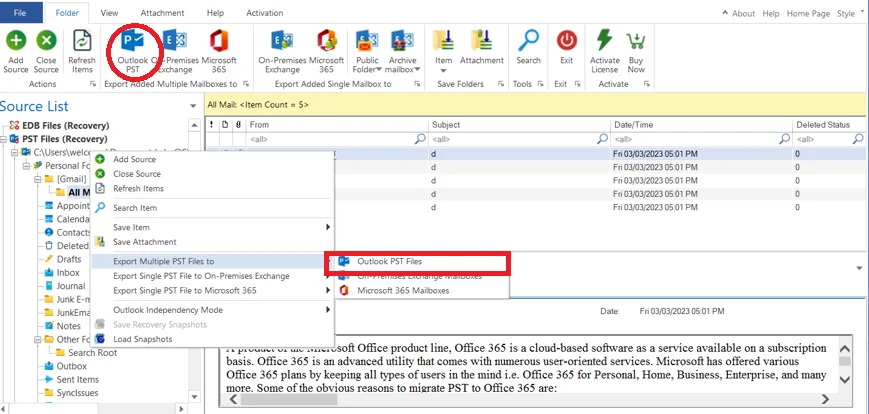
Step 6: Choose the desired export option, such as PST, Office 365, or Live Exchange Server.
Step 7: Specify the destination location or server details and click Export to begin the recovery process.
Within a short time, the repaired mailbox data is saved in the selected destination, allowing users to access their Outlook data without any loss. Shoviv Outlook PST Repair provides a fast, secure, and reliable solution for repairing damaged PST files and restoring complete mailbox data.
Gallery
Opening Hours
| Open | 24 x 7 Hours |
|---|
Recent Questions and Answers
Have a question? Ask away!
Related Listing

Retouch Aid

Secret Tantric - VIP Erotic Massage London

K&K Studio