WholeClear PST to EML Converter Case Study: Converting 20,000 Outlook Emails to EML
By Daisy Porter 02-09-2026 9
Overview
Over several years, a company had collected about 20,000 Outlook emails in a PST archive. The mailbox contained normal business email, attachments, critical email headers, messages sorted into multiple folders and subfolders.
The main task was to export these emails from the Outlook-specific PST format to EML files. They chose EML format because it is supported by a number of email clients – Thunderbird, Windows Live Mail, Outlook Express, eM Client, etc.
The challenge was not just changing the file extension. The company needed the email content, attachments, formatting, headers and folder structure to be usable after conversion. So the team tried out a few approaches before deciding on a dedicated conversion utility. Final test was to convert 20,000 email archive and check resulting EML data for readability and completeness.
The Migration Challenge: Managing 20,000 Outlook Messages
The first issue was the size of the email archive. They had 20,000 messages, then doing that would have meant opening each email and saving one at a time. Obviously this method was not suitable for a large archive.
There were also a number of other concerns:
- Retain the original email content
- Preserving attachments with their messages
- Keeping From, To, CC, BCC, subject, date and other header info
- Preserving email formatting, images, and hyperlinks
- Arranging files and subfolders
- Minimizing the changes in the original PST file
- Finding a solution that didn’t require sophisticated technical knowledge
The company also wanted to be able to access the converted emails outside of a single Outlook environment.
Why Migrate From Outlook PST to EML Format?
The PST file is closely related to Microsoft Outlook and is used to save all the mailbox components like emails, contacts, calendars, notes, and other data. In contrast, EML is a single email-message format, which is supported by more email applications.
Converting the PST to EML gave a bit more flexibility to access the individual messages for this project. The resulting files could then be processed by EML-compatible applications rather than relying entirely on the original Outlook mailbox.
The team also wanted to have individual email files that could be moved, archived, reviewed or imported into another compatible email application as needed.
Evaluating PST to EML Conversion Methods
Method 1: Save emails manually
The first method was to open messages in Outlook and save them individually.
This worked for a handful of emails, but was not practical for 20,000 messages. It was repetitive, manual work and carried a high risk of filing inconsistencies.
Result: Good for a few messages, not practical for a large archive.
Method 2: With Outlook and an Email Client
The team also looked at using Outlook along with another email application to move messages between the two platforms.
This could work in some cases but it required additional configuration steps. When the goal was only to convert a PST archive to individual EML files, the process was less convenient.
Result: Feasible for certain migration scenarios, but unnecessarily complex for the current requirement.
Method 3: Separate PST to EML Conversion
The last option was a dedicated PST to EML conversion utility. The approach was more in line with the real requirement, as the software was designed to extract Outlook messages and save them as EML files.
Tool-Based Solution
The team selected WholeClear PST to EML Converter for the last test. The software is designed to export Outlook PST messages to EML. The software includes support for attachments, email formatting, headers, images, hyperlinks and folder/subfolder structures. It supports ANSI and Unicode PST files and is available for Windows, macOS and Linux as well.
The biggest win here was the team didn’t have to manually process 20,000 individual messages.
Step-by-Step PST to EML Conversion Workflow
The conversion process was a straightforward workflow:
Step 1: Download the software and run it—The application was installed on a computer that had access to the PST archive.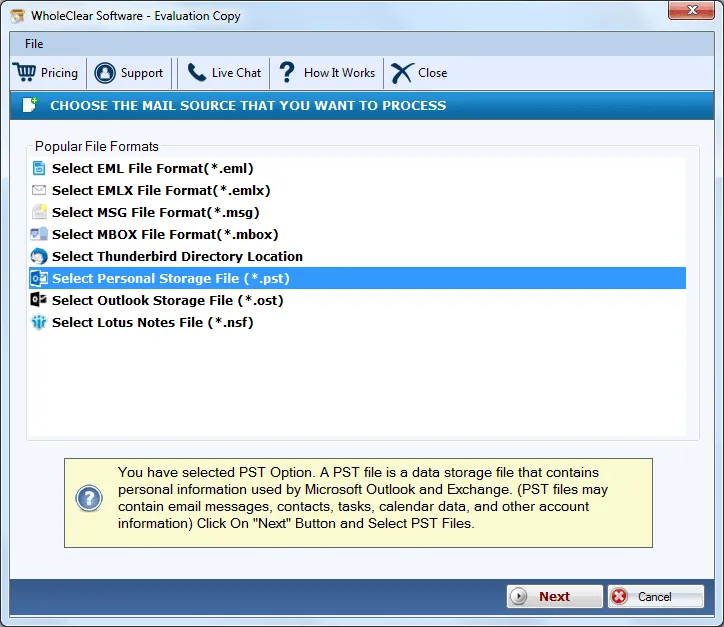
Step 2: Import PST file—The 20,000 email PST file was browsed and added to the application.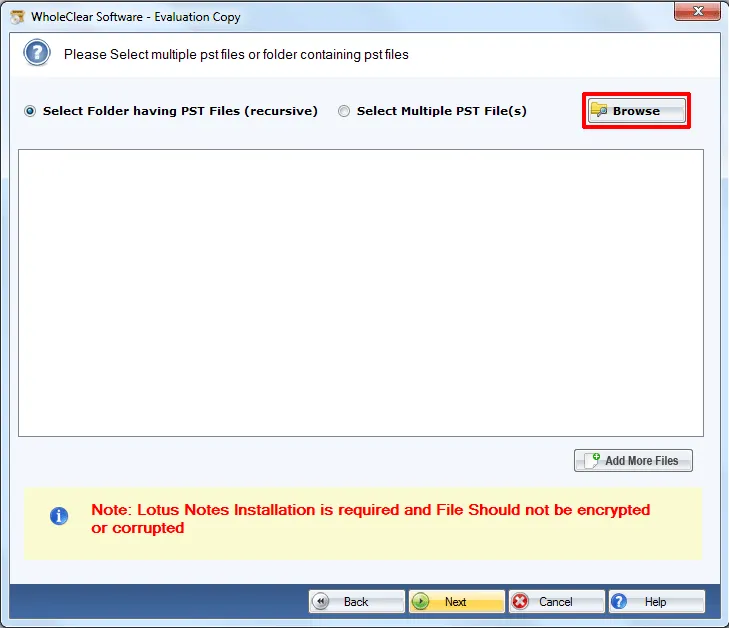
Step 3: Select Output Format —Now select EML as the output format.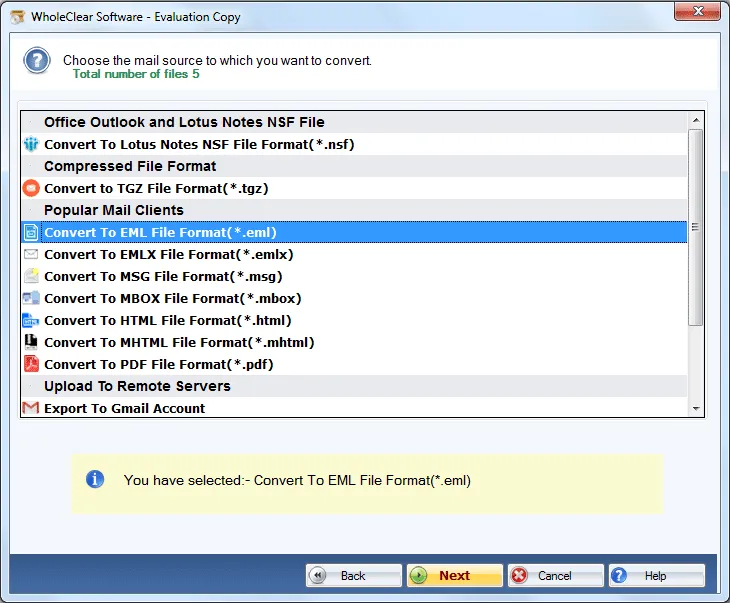
Step 4: Choose where to save the file—The resulting EML files have been saved to the selected destination folder.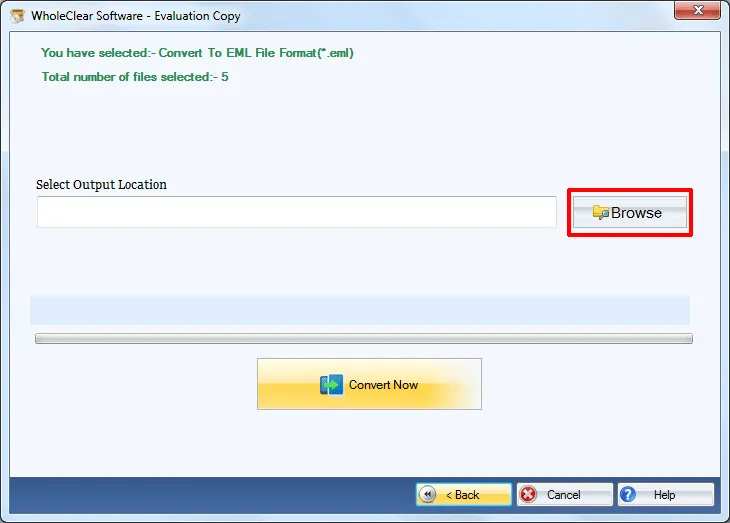
Step 5: Start the conversion—Conversion was initiated, and emails were exported in EML format.
The vendor describes the workflow as adding the PST file, viewing its contents, choosing an output location and then converting.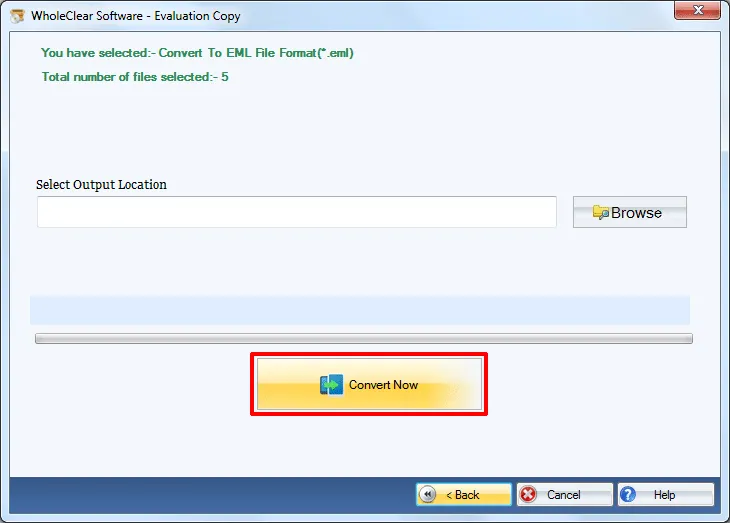
Results from Conversion
The dedicated conversion approach was more suitable for the 20,000 email requirement than manual saving.
The team had a workflow created to extract the Outlook emails instead of opening and saving each email individually. The generated EML files could then be accessed from the compatible email clients.
The team also identified email component preservation as important. The software can retain headers, formatting, hyperlinks, images, attachments and folder/subfolder structure while converting PST to EML, as stated in the product description.
Key Benefits of Using a Dedicated PST to EML Converter
The main benefits that were identified in the case study, were:
Works for large PST archives: The product documentation says PST size and message count are not limited.
Attachment support: Export emails with attachments.
Metadata preservation: Important email attributes like sender, recipient, subject, and date are preserved.
Folder organization: Maintains the folder and sub-folder structure.
Cross-platform support: The tool is available for Windows, macOS and Linux.
Simple interface: The workflow is aimed at users without advanced technical knowledge.
ANSI and Unicode support: Both common PST formats are supported.
Why the Tool-Based Method Stands Out?
The big difference was automation.
To save manually it was a matter of repeatedly interacting with individual messages. The alternative email-client approach added configuration and migration considerations. In contrast, a dedicated converter specifically handles the required PST to EML conversion seamlessly.
With a 20,000 email archive, the biggest benefit was repetitive manual work reduction. It also made it possible to preserve email components and to create a structured output rather than generating files by an inconsistent manual process.
8 Best Practices for Large-Scale PST Migrations
Before converting a large archive, organizations should observe a few basic practices:
- Backup the original PST file.
- First test the process with a small sample.
- Review attachments after conversion.
- Compare relevant email headers to the source emails.
- Check the organization of folders and subfolders.
- Ensure adequate storage for the generated EML files.
- Don’t overwrite the original PST until you have checked the converted data.
- Be careful to choose the output location so that you do not mix the converted files with unrelated data.
Frequently Asked Questions
1. How to Convert 20,000 Outlook Emails from PST to EML? Yes. The utility does not impose any restrictions on the number or size of PST emails, according to the product documentation.
2. Are attachments converted with emails? Yes, the software enables you to export Outlook emails with attachments.
3. Is the format of the email preserved during PST to EML conversion? Email formatting, headers, images, hyperlinks and other components of emails are preserved in the conversion, according to the documentation.
4. Can we open converted EML files in Thunderbird? Yes, EML is supported by Thunderbird and a few other mailers listed by the vendor.
5. Does the software support ANSI and Unicode PST files conversion? Yes. ANSI and Unicode PST formats are supported.
Conclusion
Manually converting 20,000 Outlook emails was not a feasible option for this case study. The first approaches were fine for small amounts but they are inefficient for a large archive.
The specific PST to EML approach provided a more straightforward workflow. It reduced manual effort and supported attachments, email properties, formatting and folder structures. This kind of specific conversion process may be a more feasible alternative for organizations that need to provide a large Outlook email archive in EML than having to manually save thousands of messages.