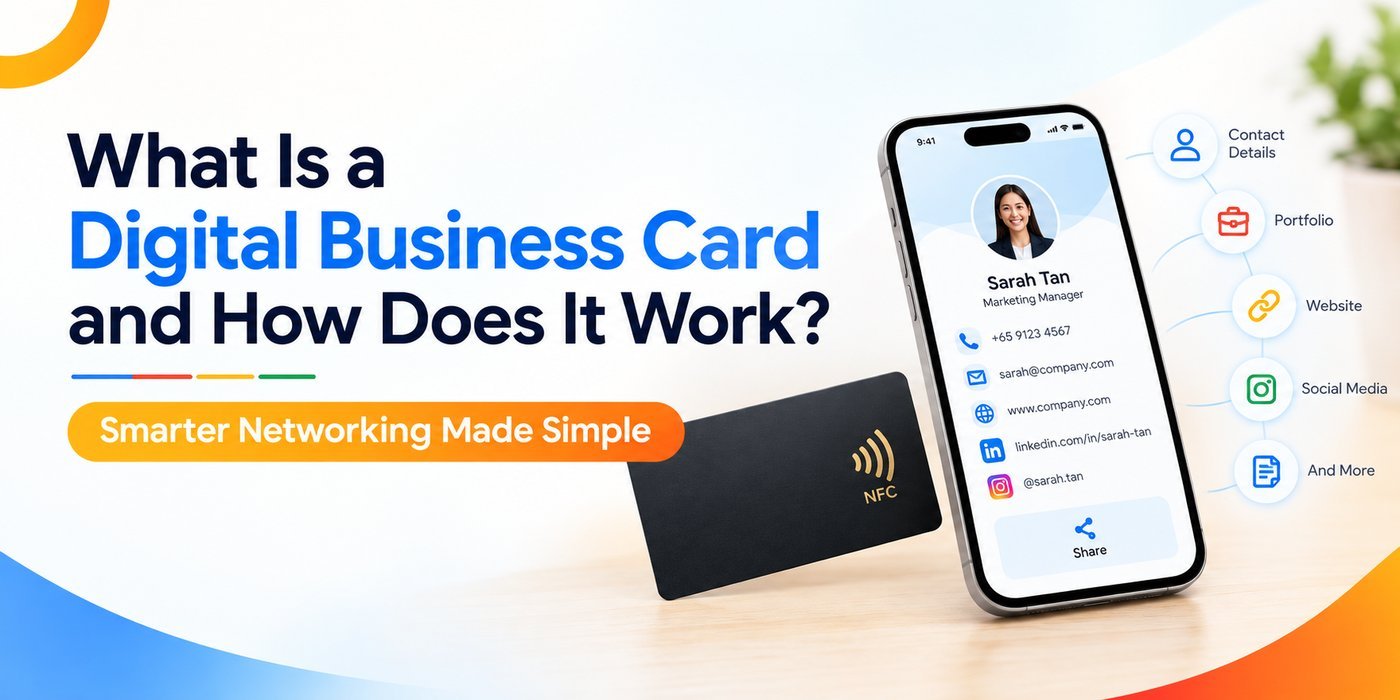
A digital business card is an electronic version of a traditional paper card that stores and shares your professional contact information — name, title, phone number, email, social profiles, and website — through a URL, QR code, or NFC tap. It works on any smartphone or device without requiring an app download, making contact sharing instant and frictionless.
If you have ever fumbled through a stack of paper cards trying to find one contact, you already understand the problem. The digital business card solves it by turning your professional identity into a shareable link or scannable code — available anytime, updatable in real time, and impossible to lose.
What Is a Digital Business Card?
A digital business card is a profile hosted online that contains all the contact details you would normally print on paper. Instead of handing someone a card, you share a link, have them scan a QR code, or tap an NFC-enabled card or device. The recipient instantly sees your profile on their phone browser — no app, no friction.
Unlike a static PDF or image, a business card digital profile is dynamic. You can update your phone number, job title, or company without reprinting anything. The person who scanned your card six months ago still sees your latest information when they open that same link.
How Does a Digital Business Card Work?
The mechanics are straightforward, but the technology behind them is worth understanding — especially if you're deciding how to share your card.
QR Code Sharing
Your digital card is assigned a unique URL. That URL is encoded into a QR code. When someone scans it with their camera app, they land on your profile page. It takes about three seconds. No app install required on either end.
NFC (Near Field Communication) Tap
NFC is the same technology used for contactless payments. An NFC-enabled physical card or wristband is programmed with your profile URL. When you tap it against someone's iPhone or Android, their phone opens your digital profile automatically. It feels like magic — but it's just short-range radio frequency communication.
Direct Link Sharing
Your profile URL can also be shared via WhatsApp, email signature, LinkedIn bio, or even printed in a document. Anyone who clicks it lands on your profile. This makes the e business card one of the most versatile networking tools available today.
What Information Can a Digital Business Card Include?
This is where digital cards go far beyond what paper can hold. A well-built digital name card typically includes:
- Full name, job title, and company
- Phone numbers and email addresses (clickable)
- Website and portfolio links
- LinkedIn, Instagram, Twitter, or other social profiles
- Profile photo or company logo
- Video introduction or product demo
- Location or meeting scheduler link
- "Save to Contacts" button for one-tap saving
The "Save to Contacts" feature alone changes the game. With paper cards, the recipient has to manually type in your details — and most never do. With a digital card, they tap once and you're saved in their phone.
Why Are Digital Business Cards Replacing Traditional Ones?
Paper business cards have been around for over 400 years. So why are professionals globally moving away from them right now? Several forces are converging at once.
The Environmental Case
Approximately 10 billion paper business cards are printed globally each year — and studies suggest around 88% are thrown away within a week. That is a staggering amount of waste. For sustainability-conscious professionals and companies, switching to a digital format is a simple, visible commitment to reducing paper consumption.
The Practical Case
Paper cards go out of date the moment you change your number or role. Reprinting costs money and time. A digital card is updated once in your dashboard and is current everywhere, instantly.
For sales teams managing dozens of reps across cities, this is a significant operational win. Team admins can update card details centrally without waiting on a print vendor.
The Analytics Case
Here is something no paper card can do: tell you who viewed your profile, when, and how many times. Digital business card platforms offer analytics dashboards where you can track views, link clicks, and contact saves. For sales professionals and entrepreneurs, this data feeds directly into follow-up strategy.
Digital Business Cards vs. Traditional Business Cards
Who Should Use a Digital Business Card?
The short answer: anyone who networks professionally. But some groups see outsized benefits.
Sales professionals benefit from the speed of sharing and follow-up analytics. Knowing that a prospect viewed your card three times after a meeting is a useful signal before a follow-up call.
Entrepreneurs and founders often wear many hats — consultant, investor, speaker. A digital card lets them present a full picture of who they are without squeezing everything onto 85mm of cardstock.
Corporate teams benefit from brand consistency. Every team member's card reflects the same logo, color scheme, and messaging — no rogue fonts or outdated logos slipping through.
Remote and hybrid professionals who attend virtual conferences or video calls can drop their card link in a chat window. No physical presence needed.
How to Create a Digital Business Card: A Practical Overview
Most platforms make setup straightforward. Here is the general process:
- Sign up on a digital card platform and choose a plan.
- Enter your details — name, title, contact info, social links, photo.
- Customize the design to match your brand colors and logo.
- Get your QR code and link — both are generated automatically.
- Share it — add it to your email signature, LinkedIn bio, or order an NFC card.
- Update anytime — edits reflect across all shared links instantly.
The whole setup typically takes under fifteen minutes. Compared to sourcing a designer, approving print proofs, and waiting for delivery — that is a considerable difference.
What to Look for in a Digital Business Card Platform
Not all platforms are built the same. Before committing, evaluate these factors:
- Ease of use: Can non-technical users set up their card without help?
- NFC card option: Does the platform offer physical NFC cards that tap to your profile?
- Team management: Can an admin manage cards for an entire sales team?
- Analytics: Are profile views and click-through data available?
- CRM integration: Does it sync with tools like HubSpot or Salesforce?
- Branding options: Can you fully match your company's visual identity?
If you are evaluating options, Genic Cards offers a clean, professional solution built for individuals and teams — combining customizable digital profiles with NFC card functionality and team management tools, all in one platform.
Frequently Asked Questions
What is a digital business card used for?
A digital business card is used to share your professional contact information — phone, email, social links, and website — instantly via a QR code, NFC tap, or URL. It replaces printed cards and keeps your details current without requiring reprints.
Do you need an app to use a digital business card?
No. Most digital business cards open directly in a mobile browser when scanned or tapped. The recipient does not need to install any app, which makes sharing fast and removes barriers during in-person networking.
Can I update my digital business card after sharing it?
Yes. That is one of the key advantages. Any edits you make to your profile — new phone number, job title, or added links — update in real time across all previously shared QR codes and links automatically.
Is a digital business card better than a paper one?
For most professionals, yes. Digital cards are updatable, trackable, environmentally friendly, and can hold far more information than a printed card. They also allow one-tap contact saving, which significantly improves the chance your details are actually kept.
How do I share a digital business card virtually?
You can share it by sending the link via email, WhatsApp, or SMS, adding it to your email signature or LinkedIn bio, or displaying your QR code on screen during video calls. No physical proximity is required.
Are digital business cards safe to use?
Yes. Reputable platforms use HTTPS encryption and do not expose your data beyond what you choose to share. You control exactly what appears on your profile, and most platforms do not sell your contact data to third parties.
Tags : Digital Business Card