The Small Business Guide to Choosing the Right Free Website Uptime Monitor
By Peter Dong 23-08-2026 130
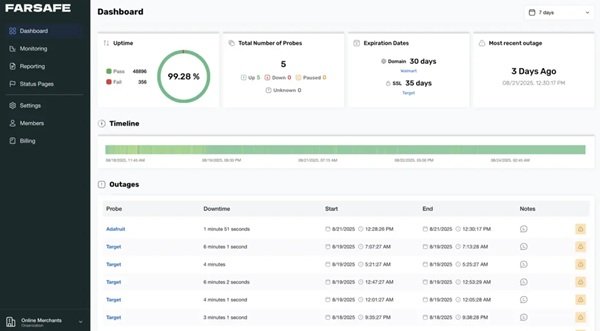
A business website is often the front door to a company, operating around the clock to capture leads, process transactions, and answer customer inquiries. When that front door unexpectedly locks itself, the consequences are immediate. Potential clients encounter blank screens, paid advertising clicks land on broken destinations, and search engines find unresponsive servers.
Many small business owners assume that comprehensive infrastructure monitoring requires complex software or a massive monthly budget. That assumption is outdated. Modern web infrastructure makes it entirely possible to safeguard an online presence without spending a single dollar. Understanding how to evaluate, configure, and maximize a no-cost monitoring solution allows growing brands to maintain high availability, protect search visibility, and deliver a smooth user experience.
The Hidden Cost of Undetected Website Outages
Website downtime rarely announces itself at a convenient hour. It often strikes quietly during database updates, third-party plugin conflicts, unexpected traffic surges, or host-level hardware issues. Without an automated system in place, business owners usually discover outages only after an annoyed customer sends an email or sales conversions abruptly drop to zero.
The financial damage of intermittent downtime goes far beyond immediate lost sales. When marketing teams run paid search or social media campaigns, every click to an unresponsive landing page is direct ad spend wasted. Visitors who encounter an error message rarely stick around to refresh the page. Instead, they hit the back button and visit a direct competitor, permanently eroding customer trust and acquisition efficiency.
From a technical search engine optimization standpoint, recurring server errors signal instability. Search engine crawlers like Googlebot encounter 500-level HTTP status codes or prolonged connection timeouts when attempting to index your site. If these access problems persist over days or weeks, crawl frequency slows down, rankings for critical commercial keywords slip, and previously indexed pages risk falling out of search results entirely.
What to Look for in a Free Website Monitoring Tool
Navigating the landscape of entry-level monitoring solutions requires knowing which specifications genuinely protect your site and which are merely marketing noise. A reliable free website monitoring tool should deliver robust baseline telemetry, verify server responses across multiple regions, and alert your team the moment availability drops.
Check Frequency and Multi-Location Verification
Check frequency dictates how often a service sends automated requests to your server. While enterprise packages offer thirty-second pings, a high-quality free tier should check your endpoints every one to five minutes.
Equally vital is geographic diversity. A single monitoring node in North America cannot tell you if customers in Europe or Asia are facing network routing failures. The right solution tests your site from diverse global locations and performs automated multi-node verification before sounding the alarm. This prevents panic-inducing false positives caused by temporary local network jitter.
Multi-Protocol Coverage Beyond Basic HTTP
While checking standard web pages is the primary task, robust monitors evaluate several network protocols:
HTTP and HTTPS Checks: These verify that your web pages return a healthy 200 OK status code and render content within an acceptable response time threshold.
SSL and TLS Certificate Tracking: An expired security certificate triggers severe browser warning screens that scare visitors away. Quality tools track certificate validity and issue advance warnings weeks before expiration.
Ping and Port Monitoring: Tracking ICMP ping responses alongside specific port availability (such as port 80 for web traffic, port 443 for secure connections, or port 25 for mail servers) provides immediate insight into broader server health.
Incident Notification Channels and Response Times
Telemetry is worthless if the alert arrives too late. Evaluate the communication channels included with any service you consider. Reliable tools send instant alerts via standard email, SMS messages, or direct webhooks connected to team communication tools like Slack, Microsoft Teams, or Discord. Having actionable alerts routed to the right team members guarantees rapid incident resolution.
Common Limitations and How to Navigate Them
Free monitoring plans provide immense value, but they come with clear boundaries that small business owners must navigate wisely.
Data retention is one of the most common trade-offs. While premium enterprise suites store performance logs for years, free versions generally maintain incident logs and uptime records for thirty to ninety days. For most small businesses, this window is more than sufficient to spot recurring server trends, assess hosting stability, and hold web hosts accountable to their service level agreements.
Another frequent constraint is the total number of monitorable endpoints. Free plans typically allow between three and ten distinct targets. To make the most of this allocation, avoid wasting checks on static, low-traffic pages. Focus your limited monitors strictly on mission-critical assets, such as your primary homepage, your checkout funnel, your contact form, and key customer API endpoints.
Step-by-Step Implementation Framework for Small Teams
Setting up a reliable monitoring system takes less than fifteen minutes when approached with a clear strategy.
1. Map Your Core Digital Assets
Begin by listing the specific URLs that drive real business revenue. Your primary domain is the starting point, but you should also monitor specific dynamic endpoints like user login portals, booking engines, and product search pages. This ensures that hidden backend database errors are caught even if your static homepage appears to load normally.
2. Configure String Matching and Status Thresholds
Basic uptime checks confirm whether a web server responds, but a broken site can still return a false 200 status code while displaying a blank page. Configure content matching rules that search for specific HTML elements or unique text strings on your page, such as your brand name or footer copyright. If that specific text fails to render, the monitor treats the page as down.
3. Establish a Transparent Status Page
Customer communication during an outage determines whether your brand appears professional or amateurish. Many modern monitoring tools include hosted public status pages at zero cost. By pointing your users to a clean status page during unexpected downtime, you reduce customer support tickets and build genuine trust through transparent communication.
Frequently Asked Questions
What is the standard check interval for a free uptime monitoring service?
Most free monitoring services provide automated checks ranging between one and five minutes. For typical small business websites, blogs, and local service platforms, a three to five minute interval offers plenty of visibility to resolve technical issues before they impact large numbers of visitors.
How does website downtime affect Google search rankings?
Brief outages lasting a few minutes generally have no long-term effect on search rankings. However, if a website remains inaccessible for extended periods, search engine crawlers encounter recurring connection timeouts and 500 internal server errors. This leads to reduced crawl frequency and temporary or permanent loss of organic keyword positions.
Can a free monitor alert me before my SSL certificate expires?
Yes. Many high-quality free tools include automated SSL certificate tracking. They continuously inspect your certificate validation dates and send automated email alerts thirty, fourteen, and seven days before expiration, ensuring you renew your security credentials without disruption.
How do monitoring tools prevent false down alerts caused by network hiccups?
High-grade uptime monitors rely on multi-node confirmation logic. When an initial ping fails from a single server location, the platform immediately sends secondary requests from two or three other global nodes. The service only triggers an outage alert after multiple independent locations confirm the failure.
What is the main difference between synthetic monitoring and real user monitoring?
Synthetic monitoring uses automated scripts and servers to simulate user requests to your website at scheduled intervals, catching outages before real visitors encounter them. Real user monitoring tracks actual human interactions on your site in real time, capturing performance metrics like page load speed across different devices and networks.
Is a free uptime monitor sufficient for an active e-commerce store?
A free uptime monitor provides an excellent baseline for small to mid-sized online stores by monitoring primary domain availability, SSL health, and key landing pages. As stores scale into complex multi-step checkout processes and massive catalog databases, upgrading to advanced transaction monitoring becomes a natural next step.
Maintaining high website availability does not require a large technical budget or complex enterprise architecture. By selecting a dependable monitoring platform, tracking mission-critical endpoints, and configuring intelligent alerts, small business owners can protect their digital reputation, maintain technical search rankings, and guarantee a dependable online presence. Implementing these baseline checks today safeguards your revenue and gives your team complete peace of mind.