Popover and Dialog APIs: Why Native HTML Is Replacing JavaScript-Heavy UI Components
By Ayesha Sultana 12-10-2026 5
The Architectural Burden of Legacy JavaScript Overlay Components
Modal windows, tooltips, dropdowns, and contextual overlays are common interface elements, yet their implementation can introduce unnecessary complexity into enterprise front-end architectures. Libraries such as Bootstrap Modals, Tippy.js, and Radix UI primitives provide useful abstractions, but their dependencies, event handlers, positioning logic, and accessibility management can increase maintenance requirements and JavaScript bundle footprint.
The cost extends beyond downloaded code. Overlay components frequently interact with nested stacking contexts, dynamically positioned elements, scroll containers, and keyboard events. Developers may spend considerable time resolving z-index conflicts, synchronizing component states, and maintaining focus trap implementations across different interaction patterns. These concerns become harder to manage when multiple libraries implement similar behavior independently.
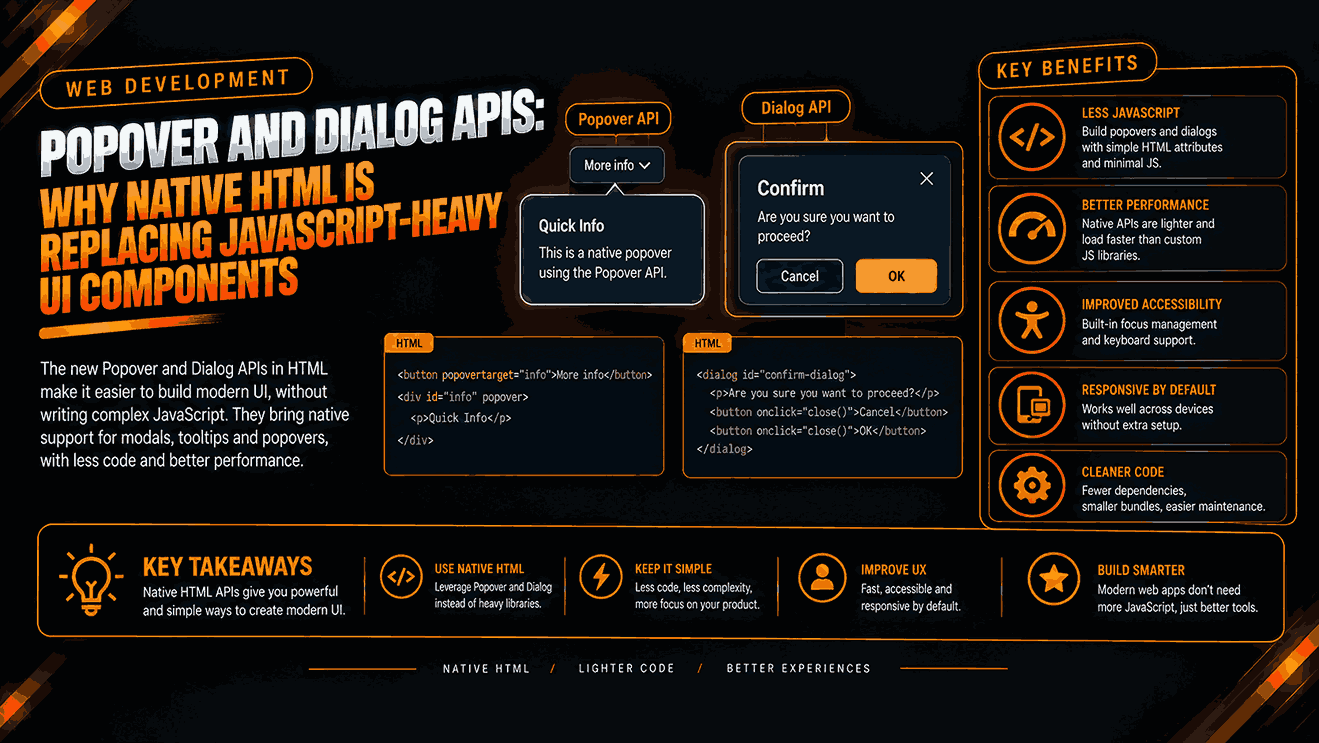
Native browser APIs provide a different architectural approach. The HTML popover attribute and the <dialog> element delegate important overlay behaviors to browser-managed mechanisms. Top-layer rendering places eligible elements above ordinary document content without requiring developers to manipulate stacking order through increasingly complex CSS rules.
This does not eliminate every performance bottleneck. Browser rendering, application logic, DOM updates, and network requests still determine overall responsiveness. However, replacing unnecessary JavaScript abstractions with native primitives can reduce implementation overhead and simplify interaction management. Engineering teams should evaluate this opportunity through measured bundle analysis, accessibility testing, and real-user performance data rather than assuming that every native implementation automatically outperforms every library.
Native Browser Primitives and the Shift Toward Zero-Dependency UI Architecture
The HTML popover attribute introduces declarative support for displaying and hiding contextual interface elements. Applying popover to an element allows developers to control its visibility through browser-supported behavior. Values such as auto and manual determine dismissal characteristics, while popovertarget connects a triggering control to its associated popover.
Automatic popovers support light dismiss behavior, allowing users to dismiss an overlay by clicking outside it or using the Escape key. This reduces the need for custom event listeners in common interaction patterns. Popovers also enter the browser's top layer, avoiding many conventional z-index conflicts. They do not automatically become modal, however, and they do not provide the same focus-management guarantees as modal dialogs.
The <dialog> element addresses a different requirement. Calling showModal() opens a dialog modally, places it in the top layer, makes the surrounding document inert, and establishes browser-managed modal focus behavior. By comparison, show() opens a non-modal dialog, allowing interaction with the surrounding page. Developers must select the method that matches the intended interaction model.
A capable web development company can assess existing overlay dependencies and identify components suitable for replacement without disrupting established workflows. Specialized web development services in pakistan can also support distributed engineering teams working on browser-native implementations, compatibility testing, and maintainable application architectures.
The objective is not to eliminate JavaScript entirely. Native HTML provides the underlying interaction mechanisms, while JavaScript remains useful for asynchronous data loading, application state, validation, and complex business logic.
Core Engineering Pillars for Deploying Native Popover and Dialog APIs
Successful implementation requires deliberate decisions about interaction semantics, accessibility, and browser support. Engineering teams should establish consistent component contracts before replacing existing libraries.
- Use declarative popover controls: Connect buttons to popovers through popovertarget. Where supported, popovertargetaction can specify show, hide, or toggle behavior. This removes custom event listeners for straightforward visibility changes while preserving semantic HTML controls.
- Choose the correct dialog method: Use showModal() for workflows that require exclusive interaction, such as destructive-action confirmations or mandatory decisions. Use show() when the dialog should remain non-modal. Apply ::backdrop styling to communicate modal boundaries without constructing a separate overlay layer.
- Preserve keyboard accessibility: Native modal dialogs provide browser-managed focus containment and support Escape-based dismissal unless configured otherwise. Ensure opening controls are keyboard accessible, focus returns appropriately after closure, and the dialog has an accessible name through a visible heading associated with aria-labelledby or an appropriate alternative.
- Implement dismissal deliberately: Automatic popovers support light dismissal and Escape handling. Manual popovers require explicit dismissal controls and appropriate application logic. Do not assume that every popover behaves like a modal dialog or that every interaction should close automatically.
- Test browser compatibility: Verify feature support against the application's browser requirements. Use progressive enhancement or a carefully selected fallback when required environments lack a necessary capability. Validate screen-reader announcements, focus order, touch interaction, and automated accessibility checks before removing established dependencies.
These checkpoints keep the implementation aligned with native browser behavior while reducing the risk of regressions during component migration.
Scaling Front-End Performance Across Modern Enterprise Applications
Enterprise applications often accumulate overlay dependencies through design systems, third-party widgets, and independently developed product modules. A migration should begin with dependency mapping rather than a wholesale replacement. Engineering teams can identify duplicated modal implementations, measure compressed JavaScript transfer sizes, inspect execution costs, and determine which components depend on specialized library features.
Interaction to Next Paint (INP) measures how quickly a page responds visually to user interactions throughout a visit. Reducing JavaScript execution and unnecessary event handling can improve responsiveness when those operations contribute to interaction delays. Native overlays may help by eliminating avoidable processing, but they cannot independently guarantee better INP. Expensive rendering, long-running application tasks, and excessive DOM updates still require separate investigation.
Professional web development practices therefore combine API adoption with performance profiling, accessibility validation, and regression testing. Teams should establish baseline measurements and compare results after migration using browser performance tools and real-user monitoring. Changes to INP, JavaScript execution time, and transferred bundle size provide stronger evidence than source-code size alone.
Custom Web Development Services can help organizations establish shared overlay components, define consistent interaction contracts, and maintain fallback strategies across complex applications. A centralized implementation also prevents individual teams from reintroducing unnecessary dependencies through separate component packages.
The appropriate migration scope depends on browser support requirements, design-system constraints, and the complexity of existing interactions. Some advanced overlays still benefit from established libraries, particularly when they require sophisticated positioning, nested menus, or specialized accessibility behavior.
Modernizing Application Architectures for Superior Runtime Performance
Native popover and dialog APIs offer practical alternatives to JavaScript-heavy overlay implementations when their built-in behavior satisfies application requirements. Their advantages include browser-managed top-layer rendering, simpler visibility controls, fewer custom event handlers, and reduced reliance on manually maintained focus-management logic.
These benefits can improve maintainability and reduce client-side overhead, although actual Web Vitals improvements depend on the application's existing implementation and runtime workload. Engineering teams should also account for accessibility requirements, browser compatibility, styling constraints, and interactions that native primitives do not cover automatically.
Modernization works best as a measured architectural initiative. Audit existing overlay components, identify redundant dependencies, migrate suitable use cases, and validate the results against performance and accessibility benchmarks. Retain specialized tooling where it provides capabilities that native APIs cannot adequately replace.
For organizations planning this work, Osama Arshad Pvt Ltd provides Custom Web Development Services focused on application architecture, front-end engineering, and performance-oriented implementation. Engineering leads, software architects, and product managers can schedule a technical UI audit with our specialists to evaluate overlay dependencies, identify opportunities for native HTML adoption, and establish a practical roadmap for improving web application responsiveness and long-term maintainability.