Pixal3D Explained: A Simple Tool for Turning Images into 3D Models and Who Can Use It
By Jimmy Lee 03-06-2026 60
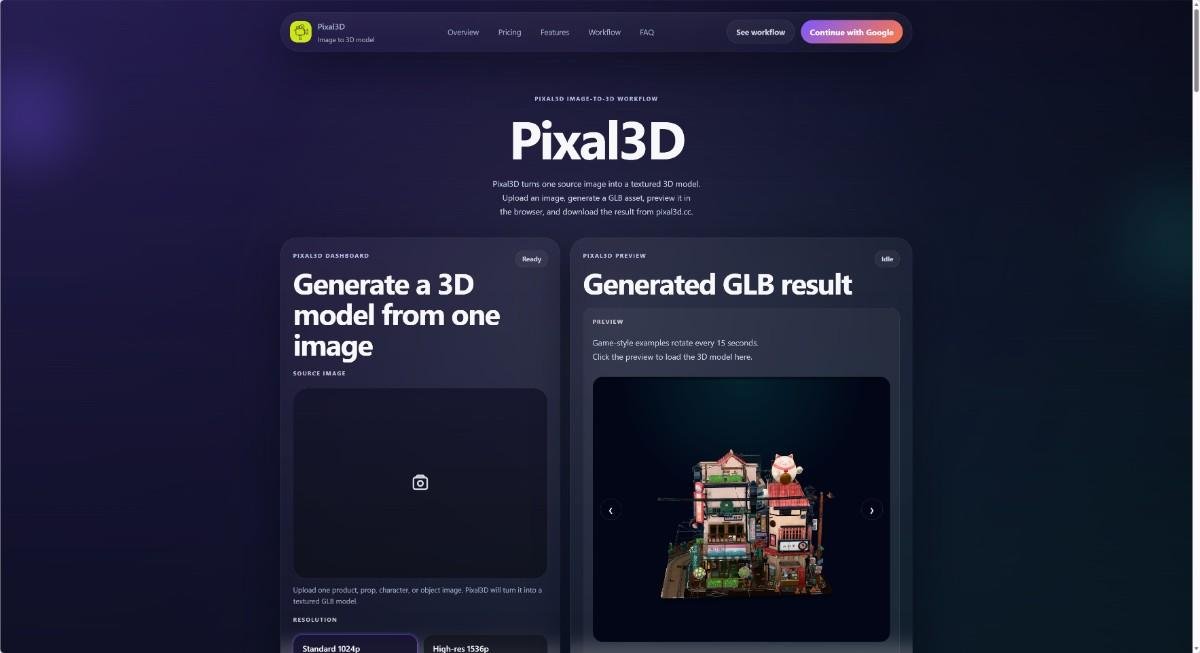
Have you ever needed a 3D model but did not know how to make one? Pixal3D is a web tool that changes pictures into 3D models. You do not need to install any software. Everything happens in your browser. This article will explain what Pixal3D is, how it works, and who can get the most out of it.
## What Is Pixal3D?
Pixal3D is an "image-to-3D model generator." That means you give it one picture, and it creates a 3D model from that picture. The model comes with textures (colors and patterns) and is saved in a format called GLB. GLB is a common file type for 3D objects used in games, websites, and apps.
The tool has a simple dashboard. You upload one image – like a photo of a product, a character drawing, or a prop. Then you choose how much detail you want. After that, Pixal3D uses AI to turn your image into a 3D model. You can then preview the model in your browser, download it, and even come back to it later because the site saves your generation history.
Pixal3D uses a credit system. Each time you generate a model, you spend some credits. You can buy credits with a subscription. There are three plans: Basic, Standard, and Pro. The prices are different based on how many credits you need per year.
## How Does the Workflow Work?
The process is very simple. Follow these steps:
1. **Upload an image.** You choose one picture of an object, character, or scene. The picture should be clear.
2. **Pick a resolution.** You can choose 1024p (standard, faster) or 1536p (high-res, more detail). The high-res option costs more credits but gives better texture quality.
3. **Generate the model.** Click the button. The tool will start working. It may take a few seconds or minutes depending on the complexity.
4. **Preview the result.** Once ready, you can see the 3D model in your browser. You can rotate it, zoom in, and check the details.
5. **Download or save.** If you like the model, you can download the GLB file. It is also saved in your generation history, so you can download it again later.
The whole workflow is designed to be repeatable. You can come back and generate more models whenever you want.
## Who Should Use Pixal3D?
Pixal3D is not for everyone. It is a tool for people who need a quick 3D model from a single image. Here are the groups that will find it most useful:
### Product Teams and Designers
If you work on a product, you often need to show how a product looks in 3D. For example, you might want to create a 3D preview for an online store. Or you might need a 3D asset for a marketing video. With Pixal3D, you can take a simple product photo and turn it into a textured 3D model. This saves time and money compared to hiring a 3D artist.
### Game Creators and Indie Builders
If you make games, you need lots of 3D props, characters, and objects. But modeling every piece by hand is slow. Pixal3D can help you generate draft models quickly. You can then use these models as a base and refine them in other tools. The site has sample models like a "Game Soldier," "Expressive Robot," and "Toy Car." These show the kind of results you can get.
### Hobbyists and Beginners
You do not need to be a professional to use Pixal3D. If you just want to make a 3D version of a drawing or a photo for fun, this tool is easy to learn. There is no complicated setup. You just upload and click.
### Fashion and Accessory Creators
Do you design shoes, bags, or jewelry? You can photograph your item and use Pixal3D to create a 3D model. This can be used for online catalogs, social media, or virtual try-ons.
### Architects and Concept Artists
Even for environment concepts, Pixal3D can be useful. The site shows examples like "Littlest Tokyo" and "Virtual City." While these are sample models, they show that you can create 3D scenes from concept art.
## Core Features at a Glance
- **One image input:** You only need one source image. No multiple angles needed.
- **GLB output:** The final file is a textured 3D model in GLB format.
- **Browser preview:** You can see the model before downloading.
- **Generation history:** Your old models are saved. You can revisit them anytime.
- **Credit system:** You pay for each generation with credits. Subscriptions give you a fixed number of credits.
- **Two resolution modes:** 1024p for speed, 1536p for quality.
- **R2 storage:** Your generated models are stored on durable cloud storage.
## Pricing and Plans
Pixal3D offers three annual subscription plans. The prices shown are yearly.
- **Basic:** $118.80 per year (about $9.90 per month). You get 12,960 credits per year. That is enough for about 185 standard models or 129 high-res models.
- **Standard:** $238.80 per year (about $19.90 per month). You get 26,160 credits per year. That is around 373 standard models or 261 high-res models. This plan includes priority generation and priority support.
- **Pro:** $598.80 per year (about $49.90 per month). You get 65,760 credits per year. That is up to 939 standard models or 657 high-res models. This plan includes the fastest generation speed and expert team support.
All plans come with no watermark, private generation, and a commercial use license. So you can use the models in your projects.
## Is Pixal3D Right for You?
Think about your needs. Do you often need 3D models but do not have the skills or time to model them by hand? Do you have a single photo of an object that you want to turn into a 3D asset? If yes, then Pixal3D could be a good fit.
It is not perfect for every situation. The models are generated by AI, so they may not be perfectly accurate or optimized for every use. The site itself says the output may not always be watertight or suitable for every commercial purpose. But for quick drafts, concept work, and low-poly assets, it works well.
Also, Pixal3D is operated by an independent developer based in China. The service uses third-party AI, storage, and payment providers. That is normal for many web tools.
## How to Get Started
Go to [Pixal3D](https://pixal3d.cc/) and click "Continue with Google" to sign in. Then you will see the dashboard. You can upload an image and try the free generation if you have starter credits? The site does not mention a free trial explicitly, but you can see the workflow and preview sample models. To generate your own, you will need to subscribe.
If you have questions, you can email help@pixal3d.cc. The team is responsive to support requests.
## Final Thoughts
Pixal3D is a practical tool for anyone who needs a quick 3D model from one image. It is simple, works in the browser, and saves your history. Whether you are a product designer, a game developer, or a hobbyist, this tool can save you time and effort. Give it a try if you have a picture that deserves a 3D life.
Tags : .....