Marketing Automation Implementation: A No-Nonsense Guide to Getting It Right the First Time
By Nusrat Jahan Mim 13-06-2026 109
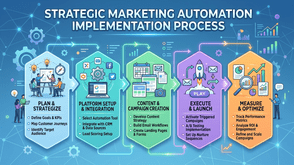
If you've ever sat through a sales demo for a marketing automation platform and thought "this looks amazing, why isn't everyone doing this?", I get it. The tools genuinely are powerful. But here's what nobody tells you upfront: the software is the easy part. The implementation is where things get messy.
I've worked on enough of these rollouts to know the pattern. A company buys a platform, gets excited about the possibilities, and then six months later half the team isn't using it, the data is a disaster, and leadership is asking why the "automation" still requires three people to babysit it.
This guide walks through what a sensible marketing automation implementation actually looks like, step by step, plus the marketing automation mistakes that derail even well-funded projects. By the end, you'll have a realistic framework you can apply whether you're rolling out HubSpot, ActiveCampaign, Marketo, or anything in between.
Step 1: Get Your Data House in Order Before You Touch the Software
This is the part everyone wants to skip, and it's the part that determines whether everything else works.
Before any automation platform goes live, you need to know:
- Where your contact data currently lives (CRM, spreadsheets, old email tools, that one Google Sheet someone made in 2019)
- How clean that data is, including duplicates, outdated emails, and missing fields
- What fields you'll actually need for segmentation (industry, lifecycle stage, source, etc.)
Here's a quick reality check: if your current contact list has a 20% bounce rate, importing it straight into a new automation platform will tank your sender reputation almost immediately. That's not a software problem, it's a data hygiene problem that the software will faithfully execute.
Practical tip: Run a data audit first. Export your contacts, check for duplicates, standardize naming conventions (is it "Marketing Manager" or "Mktg Mgr" in different records?), and decide on a single source of truth. This usually takes longer than people expect, but it saves weeks of cleanup later.
Step 2: Map Your Customer Journey Before Building Workflows
A common mistake is jumping straight into building email sequences without first mapping out what the customer journey actually looks like for your business.
Ask yourself:
- What triggers someone entering your funnel? (Form fill, demo request, content download?)
- What are the realistic stages between "stranger" and "customer"?
- Where do people typically get stuck or drop off?
For example, a B2B software company might have a journey like: website visitor downloads a guide, gets nurtured with educational content, requests a demo, gets sales follow-up, starts a trial, and then closes. Each of those transitions is a potential automation trigger.
If you skip this mapping step, you end up with automation that's technically running but doesn't match how people actually buy. I've seen workflows that send a "ready to buy?" email to someone who just downloaded their first whitepaper, because nobody mapped the journey before building the sequence.
Featured snippet answer: What is the first step in marketing automation implementation? The first step is mapping your customer journey and identifying clear trigger points, not building automated workflows. Software setup should come after you understand the stages your contacts move through.
Step 3: Start Small. Don't Try to Automate Everything at Once
This is probably the single biggest factor that separates successful implementations from frustrating ones.
When teams try to launch lead scoring, nurture sequences, sales handoffs, re-engagement campaigns, and reporting dashboards all in week one, two things happen: the team gets overwhelmed, and if something breaks, nobody can pinpoint which piece caused it.
A better approach is phased rollout:
- Phase 1: Get basic email automation working (welcome series, simple nurture)
- Phase 2: Add lead scoring once you have enough behavioral data to make it meaningful
- Phase 3: Build out sales handoff workflows and internal notifications
- Phase 4: Layer in advanced segmentation and personalization
This isn't about being slow for the sake of it. It's about building confidence in the system, training your team gradually, and catching issues while the stakes are low.
Common Marketing Automation Mistakes That Quietly Sabotage Results
Let's talk about the marketing automation mistakes I see repeatedly, because avoiding these will save you more time than any feature comparison ever will.
Mistake 1: Treating automation as "set and forget" : Workflows need regular review. A sequence that performed well a year ago might be sending outdated pricing or referencing a product that's since changed.
Mistake 2: Over-emailing new contacts: Just because you can send five emails in the first week doesn't mean you should. People unsubscribe fast when a brand floods their inbox immediately after one form fill.
Mistake 3: No clear ownership: If marketing builds the automation but sales doesn't know how leads are scored or routed, you get friction, and leads fall through cracks neither team realizes exist.
Mistake 4: Ignoring the unsubscribe and bounce data: These numbers tell you a lot about list health and content relevance, but they often get buried in dashboards nobody checks.
Mistake 5: Skipping testing before full launch: Always run new workflows through a small test segment first. I've seen a single typo in a personalization token go out to thousands of contacts because nobody previewed the live send.
How Long Does Marketing Automation Implementation Actually Take?
This depends heavily on company size and complexity, but here's a realistic range based on typical projects:
- Small business, single platform, basic workflows: 2 to 4 weeks
- Mid-size company with CRM integration and lead scoring: 6 to 10 weeks
- Enterprise with multiple integrations, complex segmentation, and sales alignment: 3 to 6 months
Anyone promising a full enterprise rollout in "just one week" is either oversimplifying or setting you up for a rushed, fragile setup.
Setting Up Reporting That Actually Tells You Something
A lot of teams set up automation, let it run, and then struggle to answer the basic question: "Is this working?"
Before launch, decide what success looks like for each workflow. Not vanity metrics like "emails sent," but things like:
- Conversion rate from nurture sequence to demo request
- Time-to-close difference between automated and non-automated leads
- Engagement drop-off points within sequences
Set up these reports before you launch, not three months after, when you're trying to retroactively figure out whether the investment was worth it.
Final Thoughts: Implementation Is a Process, Not a Launch Date
A successful marketing automation implementation isn't really about flipping a switch. It's an ongoing process of building, testing, refining, and aligning teams around how the system should work. The platforms themselves have gotten genuinely good. The difference between teams that get real value and teams that end up with an expensive, half-used tool almost always comes down to planning, data quality, and avoiding the predictable marketing automation mistakes outlined above.
If you're in the early planning stages, start with the data audit and journey mapping before evaluating specific platforms. It'll make every decision after that point easier. And if you want a second opinion on your implementation plan or need help troubleshooting workflows that aren't performing the way you expected, reaching out to a marketing automation specialist for a quick review can save you months of trial and error.
Tags : Technology Business & Marketing









