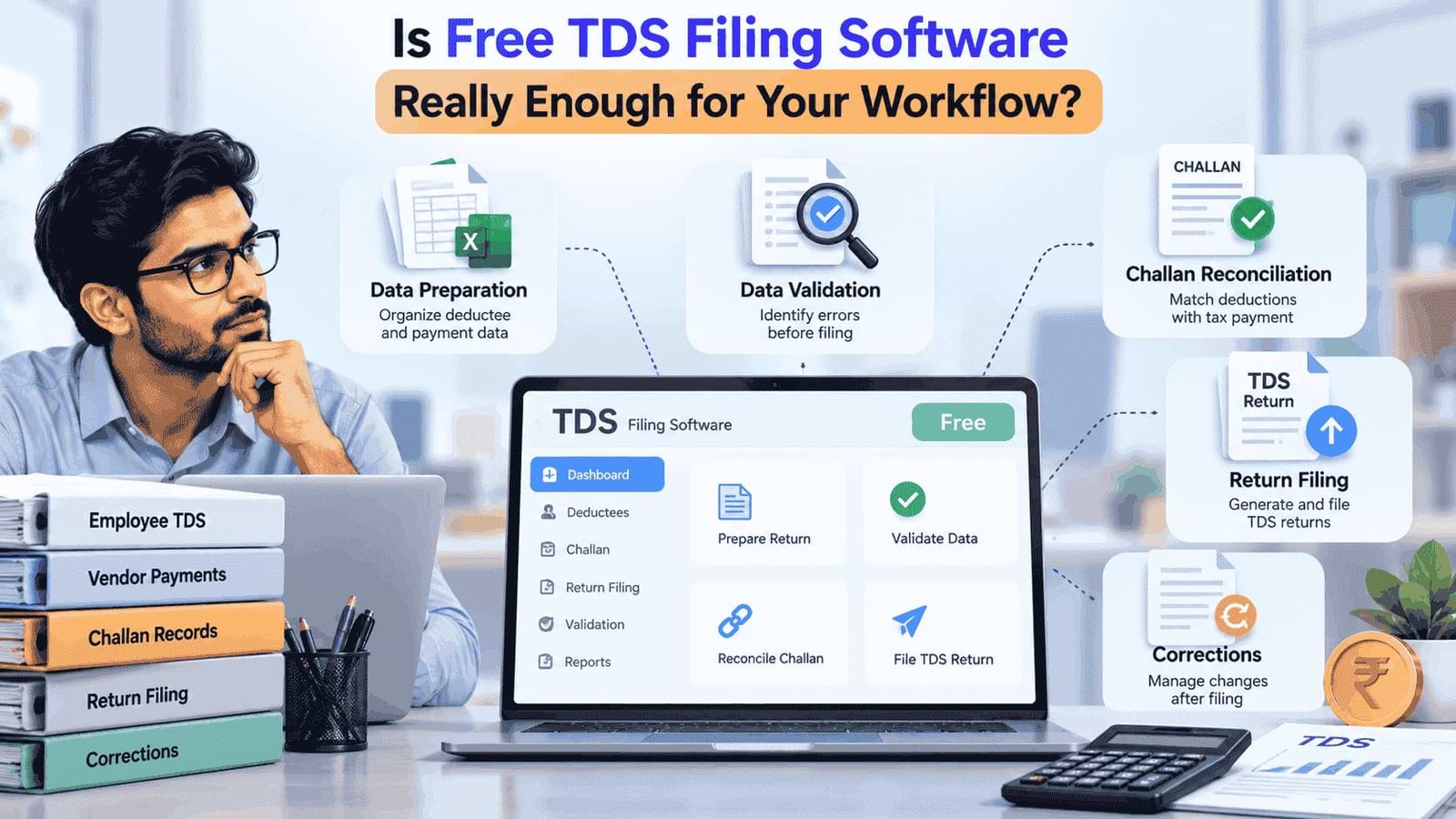
Free software can be appealing when a business or professional firm wants to keep compliance costs under control. But when it comes to free TDS filing software, the more important question is not simply whether it costs nothing. The real question is whether it can handle the complete workflow from data preparation to validation, reconciliation and filing without creating additional manual work.
For a small and straightforward filing requirement, a free solution may appear sufficient. But as transaction volumes increase or a team manages multiple returns, limitations can become more noticeable. This makes it important to evaluate free TDS filing software based on the actual compliance workflow rather than its price alone.
Free Software Can Look Sufficient at First
A basic TDS requirement may seem simple.
The team has deduction information, prepares the required records and completes the filing process. If the number of transactions is low, managing these activities manually may not feel particularly difficult.
The situation changes when the same process has to be repeated across multiple employees, vendors, deductees, clients or reporting periods.
Suddenly, the team has more information to organize, more records to check and more opportunities for inconsistencies to appear.
This is where the difference between having software and having a useful compliance workflow becomes important.
What Does the Free Version Actually Handle?
Before relying on a free tool, finance and tax teams should establish exactly what is included.
A tool may provide access to basic filing functionality while leaving other activities to be completed manually. Another solution may impose limits on records, users, returns or specific features.
The important questions are:
Can the required TDS return be prepared?
Can relevant data be imported or organized efficiently?
Are validation checks available?
Can challan information be reviewed?
Is reconciliation supported?
Can corrections be managed?
Are there restrictions on the number of records or returns?
Can the team access previous filing information when required?
The answers matter more than the word "free."
The Hidden Cost Can Be Manual Work
Suppose a finance team uses a free tool for preparing TDS returns but maintains its supporting information across several spreadsheets.
The software may not cost anything, but employees still have to:
Collect information from different records.
Clean and format the data.
Check deductee details.
Match payment information.
Review challan records.
Identify discrepancies.
Prepare the final return.
Handle corrections separately if required.
At that point, the software may have reduced the direct software expense without substantially reducing the compliance workload.
This is why businesses should consider total workflow effort, not just subscription cost.
Data Validation Is Where the Difference Becomes Visible
TDS filing depends on accurate underlying information.
Errors or inconsistencies in records can create additional checking before the return is finalized. When a business handles a larger volume of transactions, manually identifying these issues becomes increasingly difficult.
A useful filing solution should therefore be evaluated on its ability to support data validation.
For example, finance teams can consider whether the software helps them identify incomplete information, inconsistent entries or other issues before they reach the final filing stage.
If most of the checking still happens manually in spreadsheets, the team may not be getting the full operational benefit expected from software.
What About Challan Reconciliation?
Challan information is another important part of the workflow.
The tax deposited needs to correspond with the relevant deduction records. If payment information and deduction data are maintained separately, the team may need to spend additional time comparing the two.
This becomes more significant when there are numerous transactions or multiple payment records.
A practical TDS workflow should therefore connect:
Deduction data → Tax payment → Challan details → Reconciliation → Return filing
If the free solution handles only the final filing step while reconciliation remains completely manual, the team should consider whether it actually solves the main operational problem.
Corrections Change the Equation
Original return filing is only one part of the compliance lifecycle.
Sometimes information may need to be corrected after filing. The reason could be an error in the underlying information, a mismatch or another issue requiring a correction statement.
This is where a tool that looks adequate during the first filing may prove less convenient later.
Before choosing a free solution, teams should understand whether correction-related requirements can be managed within the same workflow or whether they will have to rely on separate manual processes.
For professional firms managing multiple clients, this consideration becomes particularly relevant because historical records may need to be revisited.
Can It Handle Your Filing Volume?
The right software for one organization may not be suitable for another.
A business handling a limited number of straightforward records may have different requirements from a CA, CS or finance firm managing TDS compliance for many clients.
Before choosing a free tool, consider the scale of the workflow:
Number of returns: How many returns does the team handle regularly?
Transaction volume: How many deduction records need to be processed?
Users: Will more than one person need to work with the records?
Corrections: How frequently might previously filed information need attention?
Historical data: How important is access to previous filing information?
Growth: Will the volume increase over time?
A solution that works today may become difficult to manage if the compliance workload grows significantly.
When Can Free TDS Software Be Enough?
There is no reason to assume that a free solution is automatically unsuitable.
It can be practical when the organization's requirements are limited and the available functionality covers the actual workflow.
For example, a business with a relatively small volume of straightforward TDS records may not require an extensive compliance platform.
The key is to make that decision based on requirements rather than price.
If the free tool allows the team to prepare, validate, reconcile and manage the necessary filing activities without excessive manual intervention, it may meet the requirement.
When Should You Look Beyond Free Software?
The need for a more structured solution can become clearer when the compliance workload starts expanding.
Warning signs include:
Increasing dependence on spreadsheets
Repeated manual reconciliation
Difficulty tracking filing status
Multiple people maintaining different versions of records
Increasing correction work
Growing numbers of returns or transactions
Significant time spent preparing data before filing
In these situations, the question is no longer simply "Can we file for free?"
It becomes:
"How much time and manual effort are we spending to make this free solution work?"
That is a much more useful question for finance and compliance teams.
The Better Way to Evaluate TDS Software
Instead of comparing tools only by price, evaluate the complete workflow.
Start with the activities your team performs today:
Data preparation
How is information collected and organized?
Validation
How are errors or inconsistencies identified?
Challan reconciliation
How are payment records matched with deduction information?
Return preparation
How easily can the required filing data be prepared?
Corrections
What happens when previously filed information needs to be changed?
Record management
How easily can the team access and review relevant information later?
This approach makes it easier to identify whether a free tool genuinely reduces workload or simply moves the manual work to another part of the process.
So, Is Free TDS Filing Software Enough?
Sometimes it can be. But there is no universal answer.
The suitability of free TDS filing software depends on the volume of records, complexity of the workflow, number of users and amount of manual work the team is willing to handle.
For a limited requirement, a free solution may provide everything necessary. For a growing finance or professional practice, the limitations may become more visible as reconciliation, corrections and data management become more demanding.
The best way to evaluate a free solution is therefore not to ask whether it is free. Ask whether it allows your team to manage the entire TDS workflow efficiently and consistently.
That shift in perspective helps businesses choose software based on actual compliance requirements rather than simply the lowest upfront cost.