Website crawling sounds simple on the surface. You enter a URL, start the crawler, and wait for the results. But the way a crawler discovers and checks pages can have a major impact on what you actually learn about a website.
Using the wrong crawl approach can mean spending hours scanning pages you do not need, overlooking URLs that were never linked internally, or missing problems in a website before it goes live.
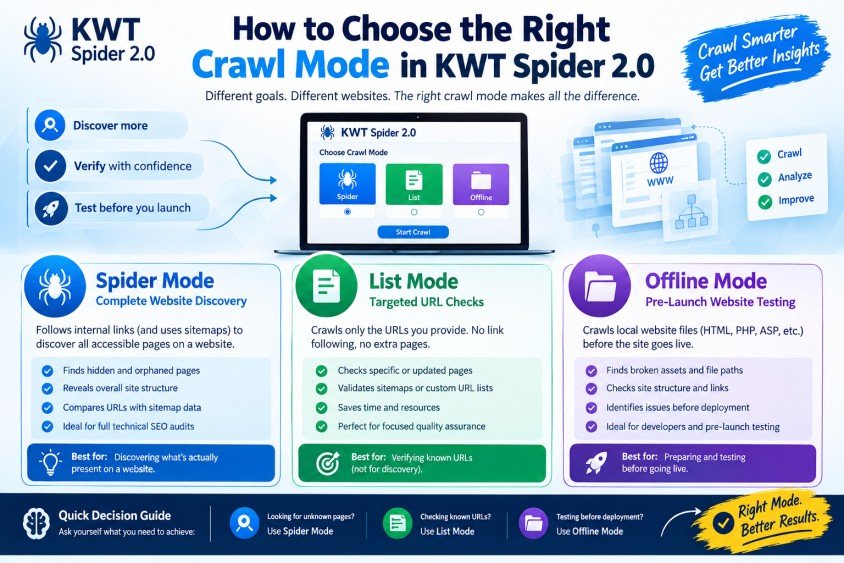
KWT Spider 2.0 addresses these different situations with three dedicated crawl modes: Spider, List, and Offline. Each mode is designed for a different type of website analysis, so understanding what each one does can help you get more useful results from your crawl.
Why Your Crawl Method Matters
Not every website audit starts with the same objective. Sometimes you need to discover everything that exists on a website. Other times, you already have a specific list of URLs and only want to verify them.
There are also situations where a website is still being developed and needs to be checked before it reaches a live server.
Using one crawl method for every situation is inefficient. The right mode depends on whether your goal is discovery, verification, or pre-launch testing.
KWT Spider 2.0 gives users control over this decision instead of forcing every project through the same crawling process.
1. Spider Mode for Complete Website Discovery
Spider Mode is the most useful choice when you want to discover the structure and content of a website from a starting point.
You provide a starting URL, and the crawler follows internal links throughout the site. Depending on the configuration, it can also use the sitemap to identify additional URLs that may not be discovered through normal link navigation.
This makes Spider Mode particularly valuable during full technical SEO audits. Websites often contain pages that are easy to forget, including old landing pages, orphaned URLs, legacy categories, duplicate content, or sections left behind after redesigns.
If you already have a list of URLs, you may not need this level of discovery. But when you are unsure about the actual size and structure of a website, Spider Mode gives you a much broader picture.
When a Full Spider Crawl Makes Sense
Spider Mode is especially useful when:
You are auditing an unfamiliar website
You want to discover internally linked pages
You suspect orphaned pages exist
You need to understand the site's overall structure
You want to compare discovered URLs with sitemap data
You are performing a comprehensive technical SEO review
The downside is that a large website can take considerably longer to crawl. It may also return pages that are not particularly useful for your audit, such as outdated or thin-content URLs.
That additional data is not necessarily a problem. If your goal is discovery, seeing the complete picture is often more valuable than keeping the crawl artificially small.
2. List Mode for Targeted URL Checks
List Mode takes a completely different approach. Instead of exploring a website through internal links, it crawls only the URLs you provide.
This makes it ideal when you already know exactly which pages need to be checked.
For example, suppose a developer has recently updated 50 product pages. There is no reason to crawl the entire website just to confirm that those specific pages are working correctly. You can provide the URLs directly and use List Mode to focus entirely on them.
Best Uses for a Controlled URL Crawl
List Mode can be useful for:
- Checking pages after technical fixes
- Validating sitemap URLs
- Reviewing a group of recently updated pages
- Testing specific landing pages
- Performing focused quality assurance
- Rechecking URLs after a website migration
Because the crawler does not follow links beyond your submitted list, this approach can also save significant time.
However, there is an important limitation: List Mode cannot discover URLs that you did not provide. If an important page is missing from your list, the crawl will not tell you that the page exists.
In simple terms, List Mode is designed for verification rather than discovery.
3. Offline Mode for Pre-Launch Website Testing
Offline Mode is designed for situations where the website files are available locally but the site has not yet been published.
Instead of entering a live URL, you can point the crawler toward a local website folder containing files such as HTML, PHP, or ASP pages.
This can be particularly useful during website development because it allows structural problems to be identified before deployment.
Find Broken Assets Before Going Live
Launching a website with missing images, broken asset references, or incorrect file paths can create unnecessary problems. Offline crawling gives developers an opportunity to identify these issues before visitors encounter them.
One useful aspect of this mode is its ability to identify broken local assets. This type of information depends on examining the actual files and their relationships on the local system, which is why it is especially relevant to Offline Mode.
Finding these problems during development is generally much easier than discovering them after a website has already been published.
How to Select the Best Crawl Mode
The three modes are not competing versions of the same feature. Each one answers a different question about a website.
Choose Spider Mode when you need to discover what is actually present across a website.
Choose List Mode when you already have a defined collection of URLs and simply need to verify them.
Choose Offline Mode when you are working with a website that has not yet been deployed and want to identify structural or asset-related problems beforehand.
Thinking about your objective before starting the crawl can prevent unnecessary processing and produce much more useful audit data.
A Simple Way to Think About the Three Options
If you are unsure which mode to select, consider what you are trying to accomplish.
Looking for unknown pages? Use Spider Mode.
Checking known URLs? Use List Mode.
Testing a website before deployment? Use Offline Mode.
This simple distinction can make KWT Spider 2.0 much easier to use, particularly when working on websites of different sizes and at different stages of development.
Why Choosing the Right Mode Improves Audits
A crawler can collect a large amount of information, but more data does not automatically mean a better audit.
A full crawl may produce thousands of URLs when you only need to verify a small group of pages. Conversely, a restricted URL list may look efficient but fail to reveal important pages that were never included in the list.
The quality of your audit therefore depends partly on asking the right question before you begin.
Even after a case is legally cleared, individuals often need an record expungement attorney to ensure background screening agencies update their databases properly.
While this is unrelated to technical website crawling, it illustrates a broader point about verification: having an expected result is different from confirming that the underlying information has actually been updated.
Final Takeaways for Better Website Crawling
KWT Spider 2.0's Spider, List, and Offline modes are designed around three different crawling requirements.
Spider Mode is the broad discovery option for understanding the true structure of a live website. List Mode provides a focused way to inspect URLs you already know about. Offline Mode moves the checking process earlier in the development cycle by allowing local website files to be examined before deployment.
The most effective approach is not to rely on one mode every time. Instead, identify whether you need to discover, verify, or prepare before selecting your crawl method.
That small decision at the beginning can save time, reduce unnecessary crawling, and help ensure that the resulting audit answers the question you actually needed to solve.
Tags : .....