Let me ask you something honest: when did you last check how fast your pages actually load?
I don't mean run a quick scroll through your site and feel good about it. I mean open PageSpeed Insights, punch in your URL, and sit with that score for a second. If you've done it recently and the number made your stomach drop a little, you're not alone. Most websites are slower than they should be, and in 2026, that slowness is costing real rankings.
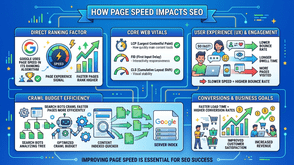
Page speed has been a confirmed Google ranking factor since 2010 for desktop and 2018 for mobile. But what's changed is how aggressively it now filters into Google's Core Web Vitals scoring, which feeds directly into where you land in search results. The technical details matter, but the practical reality is simple: a slow page loses traffic. A fast page earns it.
In this article, I'm going to walk you through exactly how page speed impacts SEO, why images are almost always the biggest drag on your load times, and how JavaScript image optimization techniques can help you fix it without a full site rebuild.
Why Page Speed Impact on SEO Is More Significant Than Most People Think
Here's the thing about page speed and Google: it's not just about ranking position. It's about staying in position.
Google's ranking algorithm incorporates Core Web Vitals as a signal. These three metrics, Largest Contentful Paint (LCP), Interaction to Next Paint (INP), and Cumulative Layout Shift (CLS), measure how real users experience your page. LCP, in particular, is almost always dominated by images. If your hero image or above-the-fold banner is a heavy, unoptimized file, your LCP score tanks. And a bad LCP score tells Google your page delivers a poor experience.
Beyond the algorithm, there's user behaviour. Studies consistently show that if a page takes more than 3 seconds to load, a significant portion of visitors leave before they even see your content. That's a high bounce rate, low dwell time, and a signal to Google that users aren't finding value, even if your content is genuinely excellent.
The page speed impact on SEO is therefore twofold: direct algorithmic weight and indirect behavioural signals. Fix your speed, and you improve on both fronts.
Images Are Typically Your Biggest Page Speed Problem
I've audited a lot of websites over the years, and the pattern is almost always the same. You open a performance report, and 60–80% of the page weight comes from images. Not JavaScript bundles. Not CSS files. Images.
There are a few common reasons for this:
Uncompressed originals uploaded directly: Someone exports a PNG from Figma or Photoshop at full resolution and drops it straight into the CMS. That single image might be 4MB. On a page with six of them, you're starting with 24MB before the browser loads anything else.
Wrong formats for the web: JPEG and PNG are still the defaults for many teams, even though modern formats like WebP and AVIF can deliver the same visual quality at 30–70% smaller file sizes.
No responsive sizing: A 2400px-wide image getting served to a mobile phone with a 390px screen means the browser downloads vastly more data than it will ever display.
No lazy loading: Every image on the page loads on arrival, even the ones sitting far below the fold that the user may never scroll to.
Each of these is fixable. And the good news is that JavaScript-based image optimization gives you tools to fix them dynamically, without manually re-exporting every image in your library.
What JavaScript Image Optimization Actually Does
When I talk about JavaScript image optimization, I'm referring to client-side and build-time techniques that automate the process of serving the right image, at the right size, in the right format, to each user.
Lazy Loading with Intersection Observer
The Intersection Observer API allows you to detect when an image enters the viewport and only load it at that point. Instead of the browser fetching all images when the page first loads, it fetches them as the user scrolls. This is now also achievable with the native loading="lazy" HTML attribute, but JavaScript-based implementations give you finer control, especially for complex layouts or single-page applications.
For SEO purposes, lazy loading has an important caveat: your above-the-fold images should never be lazy loaded. Those images contribute to your LCP score. Only apply lazy loading to content below the visible viewport on initial load.
Responsive Images with srcset and JavaScript
The srcset attribute lets you define multiple versions of an image at different resolutions, and the browser picks the most appropriate one based on screen size and pixel density. JavaScript frameworks like Next.js and Nuxt.js have built-in image components that generate these srcset values automatically at build time, meaning you upload one image and the system handles the rest.
This alone can dramatically reduce mobile page weight. A user on a standard smartphone gets a 480px-wide image instead of the 1920px version served to a desktop monitor.
Format Detection and WebP/AVIF Delivery
Modern JavaScript and server-side tooling can detect browser support for WebP or AVIF and serve the appropriate format. The HTML <picture> element with <source> tags is the standard approach, but JavaScript image libraries like Sharp or Cloudinary's SDK can automate this entirely in your build pipeline.
WebP images are typically 25–35% smaller than JPEG equivalents. AVIF pushes that further. If you're still serving PNG and JPEG across the board, switching formats is one of the highest-ROI changes you can make for page speed.
How to Prioritise Image Optimisation for Maximum SEO Gain
Not all images on your site carry equal SEO weight. Here's how I prioritise when working with a client's site:
Start with LCP images: Run your URL through PageSpeed Insights and identify which image is flagged as the LCP element. That's your highest priority. Compress it, convert it to WebP, and make sure it's served with a proper preload hint in the <head> so the browser fetches it as early as possible.
Audit your largest image files: Use the Network tab in Chrome DevTools, filter by image, and sort by file size. The biggest files are your biggest wins.
Check for layout shift caused by images: If your images don't have explicit width and height attributes defined, the browser doesn't know their dimensions until they load, causing content to jump around. This is a direct CLS problem. Add dimensions or use CSS aspect-ratio to reserve space.
Implement lazy loading for below-fold content: Once your critical above-fold images are optimized and preloaded, apply loading="lazy" to everything else.
For teams using React, Next.js, or similar frameworks, the <Image> component handles most of this automatically. For WordPress sites, plugins like ShortPixel, Imagify, or Smush handle compression and format conversion server-side. Either way, there's no good reason to be serving unoptimized images in 2026.
What Good Page Speed Looks Like (And How to Measure It)
For reference, Google's current thresholds for Core Web Vitals are:
- LCP: Under 2.5 seconds is "Good." Over 4 seconds is "Poor."
- INP: Under 200 milliseconds is "Good."
- CLS: Under 0.1 is "Good."
A page score of 90+ on PageSpeed Insights for mobile is a solid target. Achieving it typically requires not just image optimization but also proper caching, a content delivery network (CDN), and clean JavaScript execution. But in my experience, fixing images gets most sites 60–70% of the way there.
Tools I use regularly: PageSpeed Insights for overall scoring, WebPageTest for waterfall analysis, and Lighthouse in Chrome DevTools for detailed audits during development. [Our technical SEO audit checklist covers how to use each of these tools in sequence if you want a step-by-step process.]
Putting It All Together: A Practical Starting Point
If your site is ranking below where it should be, and your content is genuinely good, slow page speed is one of the first things I'd audit. And within that audit, images are almost always where the problem lives.
The fix doesn't have to be complicated. Start by identifying your LCP element. Compress it, convert it to WebP, and preload it. Then work through the rest of your images: add srcset for responsive delivery, enable lazy loading below the fold, and make sure every image has defined dimensions to prevent layout shift.
These aren't glamorous changes. But they're the kind of foundational work that compounds quietly over time. Your rankings improve, your bounce rate drops, and users actually stay long enough to engage with the content you worked hard to create.
If you want to go deeper, start with a full Core Web Vitals audit using the tools mentioned above, or explore how a structured technical SEO review can pinpoint exactly where your site is losing performance and what to fix first.
Tags : Digital Marketing