How a Mid-Market Agency Moved 5TB of Cloud Data in Under 48 Hours Without Losing a Single File
By Varsha Sethi 18-06-2026 245
The Message That Destroyed My Sunday Schedule
It arrived on a Thursday at 6:12 p.m.
The following four days of my life were completely turned upside down by a three-line email issued by our Managing Director, who copied our two senior project leads:
"We're moving to a different cloud platform. Before Monday's customer review, everything must be in the new setting. Legal has given their approval. IT make it happen."
I read it twice.
I then looked at the number I knew was there when I accessed our storage dashboard.
4.87 terabytes.
Seven years in an agency. 19 active customers have access to creative asset libraries. Campaign deliverables from 2018 are archived. Project folders were shared with outside contributors who were unaware of this and a deadline of Monday AM that presumed this was in some way a fair request.
I had previously completed smaller, planned cloud migrations with appropriate runbooks and two-week notice periods. None of those things applied here.
What We Were Really Transporting
I want to be explicit because migration stories that remain ambiguous are of little service to readers.
At the time, our cloud environment included:
• There are 19 active client folders, each with shared external access for client stakeholders, version history and nested subfolders.
• There are eleven internal team drives in the creative, strategy, finance and human resources divisions.
• About 340,000 separate files, ranging in size from 4GB video renders to 12KB brief docs
• There were six user accounts with varying levels of authorization, two of which had administrator privilege that had to be carried over precisely
• Three folders were in active usage, which means that while we were organizing the migration, users were putting data into them in real time.
For years, the platform we were using had worked well for us. Our MD has been advocating for a more modern and integrated environment since Q1. The issue was not the ruling per se. It was the timeframe.
Saturday Morning: Resolving the Issue That Could Really Do This
I spent Friday night eliminating possibilities.
At this file count, manual export and re-upload is not feasible without a week of labor and assured permission confusion. The native migration helper on our cloud platform has no scheduling, a 500GB session limit and no actual audit trail. A third-party IT company quoted €4,200 for urgent weekend work, but they were unable to guarantee delivery on Monday.
to eight in the morning on Saturday, I arrived to my workstation with a cup of coffee and an open Reddit thread on r/sysadmin, where someone had recounted nearly our similar situation six months prior.
The identical utility was mentioned in three different responses in that post.
I spent forty minutes reading the documentation.
Next, I performed a test migration on GainTools Cloud Migration Tool, which was 23GB in size, had a reasonably complicated nested structure and had one external collaborator with view-only access.
In eleven minutes, the transfer was finished.
The folder structure is the same.
External consent: unaltered.
The file count was exactly the same.
At 10:40 AM on Saturday, I began the whole move.
How the 48 Hours Played Out
Batch one starts at 10:40 AM on Saturday.
I began with the three most important active client files and the six user accounts.
Total size: around 2.1TB.
Any files added during the migration timeframe would be automatically recorded since incremental sync was enabled.
The first overnight check of 2.1TB was transferred on Saturday at 11:30 PM.
My phone was set up with log alerts.
There were no unsuccessful transfers.
A forward slash in a folder title that was not supported by the target platform was one indication of a subfolder with a name problem.
The transfer was restarted in a matter of seconds after I remotely renamed it.
Batch two, Sunday, 7:15 AM
All internal team drives and the remaining client folders.
The part that worried me the most was the finance and HR folders' stricter permission hierarchies, which I could not afford to breach or weaken during the transfer.
They didn't.
Final batch and verification on Sunday at 4:30 PM
All of the files uploaded over the weekend were included in the three active folders that were moved latest.
I compared the number of files in each of the 19 client folders after the conversion.
Each count was same as before.
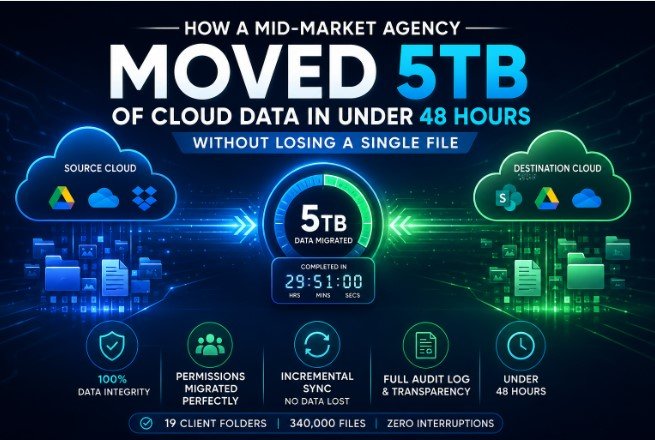
For 4.87TB, the total transfer duration was 29 hours and 51 minutes.
At 5:00 PM on Sunday, I sent the MD a one-line message that said,
“Done. Verified. Monday is fine.”
What Actually Performed Well
The mapping of permissions was precise.
The access level of each user was appropriately transferred.
Full admin rights were maintained for the two admin accounts.
Without any notification or interruption, the external client stakeholders were able to maintain their view-only access.
This is the section that typically breaks during migrations, although it did not break in this instance.
The conflict detection was quite helpful.
In a manual migration, the forward slash problem I described would have resulted in a silent failure; the file would just not transfer and I might not have discovered it until a client requested it.
It was immediately flagged by the tool.
My greatest fear was eliminated with incremental sync.
On the weekends, our creative team works.
While the transfer was underway, files were being uploaded into active directories.
The destination environment displayed each and every one of those weekend uploads.
In the interim, nothing was lost.
When examined closely, the audit log held up.
Our MD requested me to walk him through what had moved and when on Monday morning before the client review.
Every file, account, and batch was covered by the timestamped log.
The entire briefing took eight minutes.
A manual migration does not provide that level of transparency.
What I Would Modify
Since I want something to be practical rather than only attractive:
Before Saturday, I ought to have audited permits.
Two folders containing out-of-date external access—former contractors who ought to have been deleted months ago—were discovered.
I found them during the pre-migration scan, but I didn't budget for the forty minutes it took to rectify them.
There is room for greater detail in the reporting export.
The log is thorough, but before I could share it with our MD in an organized manner, the export format needed to be manually formatted.
Time may have been saved with a one-click PDF report.
A dry run will be necessary for new users.
Start with a test batch on a non-critical folder if you have never done a migration at this magnitude.
It's not because the technology is difficult—it's not—but rather because it's important to comprehend what the progress dashboard is showing you in real time when you're managing 5TB and can't afford surprises.
Morning on Monday
In the new setting, all 19 client folders were operational.
Every team member was able to log in without any problems.
The client review proceeded according to plan.
Midway through the presentation, our senior strategist, who was unaware that any of this had occurred over the weekend, opened a 2021 campaign folder to consult some historical data.
It was precisely where she had anticipated it to be.
The only measure that truly counts is that one.
Who Should Use This as a Useful Guide?
This account is pertinent if you are:
• An agency's operations or IT lead overseeing a quick cloud-to-cloud migration
• Managing permissions for external collaborators and active files that cannot be broken
• Not having a sizable IT staff or an authorized vendor budget
This situation does not apply to you if you are:
• Transferring a single personal cloud account (exporting manually is OK)
• Managing an enterprise migration with a six-week runway and a contracted vendor
• Using on-premise servers instead of cloud-to-cloud transfers
FAQs
Is it possible to collect files that are being actively uploaded during a migration?
Yes, provided that incremental sync is turned on.
During the migration window, files uploaded to source folders are immediately recognized and moved.
For organizations whose team members work on the weekends or in different time zones, this is crucial.
How do permissions for external collaborators move between platforms?
View-only, comment, and edit access are automatically mapped to the closest equivalent in the destination platform during setup, depending on the permission level granted in the source environment.
Before beginning to remove out-of-date access, audit your external permissions.
What happens if a file name includes characters that are not supported by the destination platform?
Instead of passively ignoring the file, the program highlights name issues in real time.
You don't need to restart the batch in order to rename and continue.
Forward slashes, colons and several special characters are common sources of disagreement.
Is 48 hours a reasonable time frame for 5TB, or was this a very quick outcome?
Your bandwidth, the number of files and the number of concurrent transfers all affect transfer speed.
It took somewhat less than 30 hours for our 4.87TB.
For planning purposes, I would set aside 48 hours for 5TB and consider anything quicker to be an added benefit rather than a presumption.
After the migration is finished, how can you make sure nothing was lost?
Compare the number of files in each main folder group between the source and destination.
Next, manually spot-check five to ten folders from various departments or clients, paying particular attention to those with complicated nesting or external access.
Wait until a non-IT team member has checked in and verified that their own files are correct before signing off.
Do team members have any tasks to do before or after the migration?
Prior to: log out of the source platform and empty the browser's cache.
After that, log in again to the destination platform and check one or two important folders.
If done correctly, the entire process is invisible to end users, which is just how it should be.