DataVare EDB to PST Converter Review 2026: Pros, Cons, Key Features & Step-by-Step Conversion Analysis
By jonathanjohnson 08-09-2026 5
Summary
Converting Exchange Database file to Outlook PST is a tough job, especially when the size of the EDB file is large, corrupted, inaccessible or contains multiple mailboxes. You can use a dedicated EDB to PST converter to extract the mailbox data and save it in a format that Outlook can open.
In this DataVare EDB to PST Converter Review 2026, we discussed the main features, conversion features, advantages, limitations, and working process stepwise. The intent is for administrators, IT professionals and users to be able to make a judgment as to whether the software is correct for their EDB to PST migration needs.
What is EDB to PST Converter Tool?
EDB to PST Converter is a Windows-based utility that is used to convert Exchange EDB mailbox data into Outlook PST files. Its product page says it can export public and private folders and lets you choose what to convert by filters like date range and message class.
The software also provides an option to export exchange data to EML, MSG, VCF, RTF and HTML formats. It gives mailbox preview before conversion and does not require any Outlook or Exchange Server connection to convert EDB to PST.
This makes the tool particularly useful when an organization needs to access Exchange mailbox data outside of an active Exchange environment.
Why EDB to PST Conversion?
EDB files are related to Microsoft Exchange Server, whereas PST is an Outlook data file. There are a number of scenarios when EDB to PST conversion can be useful:
- Open Outlook mailbox data from Open Exchange
- Creating an offline copy of mailbox data
- Recover mailboxes data from non-accessible Exchange database
- Migrating individual mailbox items
- reduces reliance on an Exchange Server environment
- reusing emails and other mailbox information for later use
- Extract and transform data exchange to Outlook format
EDB to PST Converter Key Features
1. Converting EDB to PST
The main aim is to convert Exchange EDB mailbox data to Outlook PST format. The software scans the EDB file before exporting the selected data to the PST file. According to the product page, the PST created can be opened with Outlook 2021, 2019, 2016, 2013 and 2010.
2. Selective export of EDB data
Users don’t have to convert each mailbox item. Data Filtering Options: Choose the data you want to export using Date Range, Message Class by DataVare. Both public & private Exchange folders can be processed.
This can be helpful when you are working with large EDB files, and you only require a specific period of time or mailbox type data.
3. Sample Conversion
The software gives a preview of exchange mailbox items before the export process. This allows the user to see what data is available and select what to convert
Preview functionality is of special value when working with large or possibly corrupted EDB databases.
4. Split Large PST File
Managing large PST files can be a hassle. DataVare provides the option to set the size of the created PST and split the output into multiple files.
This can help simplify planning and management of large conversions.
5. Export EDB to Office 365.
Other than PST conversion, the software also provides direct EDB to Office 365 migration. According to the product information, email data and attachments can be exported to Office 365 with manual and automatic mailbox mapping options.
6. Migrate from EDB to Live Exchange
The tool also supports mapping EDB mailboxes to Live Exchange mailboxes. For this kind of migration you can use the search and filtering options.
7. Recovery of corrupted EDB data
One of the more useful capabilities is the ability to process corrupt or inaccessible EDB files and export recovered mailbox data to PST file. One of the features of this product that DataVare markets specifically is the ability to recover EDB.
But when dealing with damaged databases, users should always work on a backup or a copy of the original EDB file.
8. No Need To Connect To Outlook or Exchange
Another important advantage is that the product page says that for the EDB to PST conversion you don’t need to have Outlook installed or an active Exchange Server connection.
This can make conversion easier if Exchange is not available or if Outlook is not set up on the computer.
EDB to PST Converter Review: Pros & Cons
The main benefits are, looking at the advertised features and workflow:
Pros
- Converts Exchange EDB to Outlook PST
- Supports public and private folders
- Selectivity conversion options
- has mail box preview
- Able to divide large PST output files
- Supports Export to Office 365
- Support for Live Exchange migration
- Provides the EDB recovery functionality
- No need to have Outlook for EDB to PST conversion
- Supports all versions of Exchange Server
- Includes a demo version for trial
- Customer support
Cons
Windows Compatibility –
- Demo Version Has Evaluation Limitations – The demo edition is available for testing purposes, but users may need to purchase the licensed version to perform complete conversions without evaluation restrictions.
How to Convert EDB to PST
The conversion process is supposed to be simple. The published guide of states the following workflow:
Step 1: Download and Install the Software
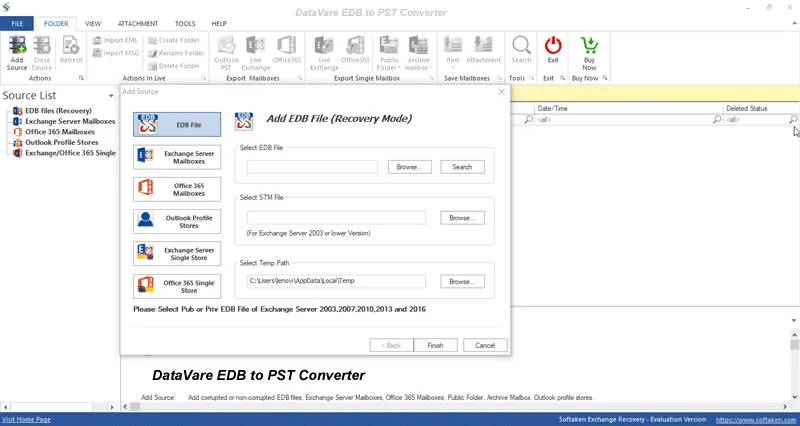
Download DataVare EDB to PST Converter and install it in your Windows machine.
Run the application after installation.
Step 2: Insert EDB File
Select the Browse option to find the Exchange EDB file saved in your computer.
Choose the EDB file you need and upload it to the software.
Step 3: Preview & Scan EDB Data
Load the EDB file and let the software scan it.
The app shows a preview of the mailbox data you are able to export, so you can review the data before exporting it.
Step 4 Select PST as an Output Format
Select Outlook PST as the export format you require.
Then you can select the required folders or mailbox items according to your conversion requirements.
Step 5: Add Filters
If you don’t want to export the entire database, you can use the filtering options that are there.
provides options like:
- Time Frame
- Message Class
- Select folder
- Selected messages
These options can help to reduce unnecessary data amount in final PST file.
Step 6: Specify the Output Location
Choose a location to save the converted PST file.
If you have a large database and want the output to be split into smaller files, set the PST splitting option.
Step 7: Begin the Conversion
Click on convert option to start exporting selected EDB file data to PST.
The software will analyze the mailbox information and save the output to the specified destination.
Step 8: Check the result
When conversion is complete, open the resulting PST in Outlook and check important folders such as:
- Sent Mail Inbox Drafts
- First Drafts
- Connections
- To Do Calendar
- Other important folders
A final and important step, particularly when converting data from business critical mailboxes, is to verify the output.
Is EDB to PST Converter Secure?
The conversion of data always includes important mailbox information, so users should take care before starting.
To have the safest workflow:
- Do not change the original database.
- Use the most recent version of the software.
- Try demo edition before buy.
- After completion check the converted PST data.
- Make sure there is enough disk space for the output PST files.
The vendor provides a demo edition for you to test the software before you buy it. Its published guide also notes that the demo can convert the first 50 items per folder.
Final Thought
DataVare EDB to PST Converter is a powerful tool to extract Exchange mailbox data into Outlook PST format. Its combination of EDB scanning, preview, selective filtering, PST splitting, corrupt EDB recovery, Office 365 export and Live Exchange migration is more than a basic EDB to PST converter utility.
The biggest strengths are the ability to work without an Outlook or Exchange connection, selective mailbox export and additional migration options. However, performance evaluation with your specific EDB files and Windows compatibility are also important things to take into consideration.
This is the right thing for organizations having large, inaccessible or damaged Exchange databases. Test the demo edition before purchasing a license.
FAQs
1. Is there any way to convert EDB to PST without Outlook?
Sure. As per product documentation, Outlook is not necessary to install for EDB to PST conversion.
2. Is it possible to convert specific EDB mailbox data?
Yeah. The application offers selective export options and filters e.g. Date Range, Message Class etc.
3. Does DataVare support public folder EDB files?
Yes. The product page states that PST export for private and public Exchange folders is supported.
4. How to convert damage EDB file to PST?
The software has the ability to recover data from damaged or inaccessible EDB files and to export the retrieved data to PST.
Tags : EDB to PST Converter