3 Ways to Crawl a Site: A Practical Guide to KWT Spider 2.0's Crawl Modes
By Whitley Laster 28-07-2026 161
Why crawl mode matters before you even hit “start”?
Most SEO people pick a crawler, hit “start” and never think twice about how it’s actually finding pages. That’s fine — until the day it misses half your site, or crawls a staging environment that no one meant to expose, or takes four hours to check twelve URLs you already have listed.
Usually that is not a crawler problem. It is a crawl mode problem.
Many tools quietly force one approach on you and call it a feature. Once you point it to a URL, it takes over, leaving you with results based on its own predefined logic. KWT Spider takes a different approach, offering three distinct ways to approach a crawl, and it puts the choice in your hands, rather than burying it in a settings menu. Choosing the right one isn't a technicality — it determines what you can find, how quickly you find it, and whether you find issues before or after they really matter.

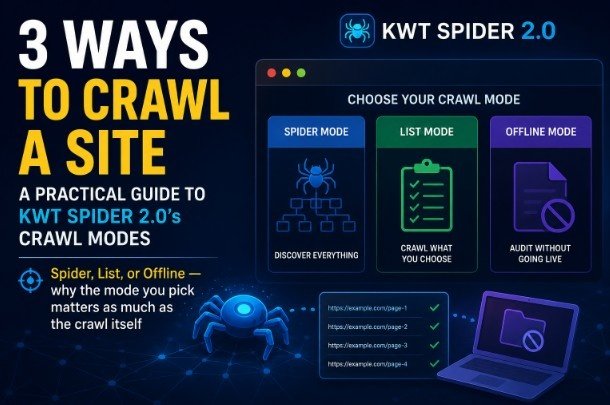
KWT Spider's three crawl modes — Spider, List, and Offline.
1 Spider Mode: For When You Don't Know What's There
There’s a reason that’s the default. You give it a starting URL, and it crawls outwards following internal links, page to page, section to section, optionally pulling in the sitemap along the way to fill in gaps that the link graph alone wouldn't catch. When it's finished you get the true shape of the site, not the shape you guessed it had.
People often underestimate how important this is. Sites gather mess over time: orphan pages that lost their internal links years ago, old category trees from a redesign, campaign landing pages nobody bothered linking back to once the campaign was over. If you only look at pages you already know about, none of this shows up. If you're doing a full audit, or you inherited a site with no clean documentation of what is actually out there, Spider mode is the only way to get an honest inventory. At that point you are not confirming a list you are building one from the ground up, the way a search engine would find the site for the first time.
There’s a trade-off, and it’s worth being honest about that. On a bigger site, a full crawl will take longer and surface pages you didn’t really need to see – test pages, thin content, the occasional accidental duplicate. That's not a bug, it's just the way of discovery." You're sweeping wide intentionally. But when discovery is the point, that noise is the cost of doing the job right, not a downside to work around.”
2 List Mode: When You Know Precisely What You Want
Sometimes you dont have to look for anything. You have to check something.
In list mode, link-following is completely skipped, and only the URLs you give it (pasted in, uploaded as a file, whatever is easiest for the batch you're working with) are crawled. It won't go off on tangents in the link graph of the site, it won't take any surprises detours, it won't decide to go off exploring somewhere you didn't ask it to explore.
This is the mode people use after a fix has gone live and they need to confirm that a particular batch of pages has actually been fixed correctly. It’s also where sitemap validation belongs—ensuring that the URLs that your sitemap claims exist actually return the right stuff—and QA on a static set, like the forty product pages that were touched in yesterday’s deploy. You already know the key pages that matter at this point. It is pointless to force the crawler to rediscover the rest of the site to get an answer.
It's noticeably faster, as it focuses only on the pages you've specified instead of exploring everything.
The honest-to-God limitation, and it is a limitation: If a page isn’t on your list, List mode will never tell you it’s there. It’s a checker, not a finder. That's fine if you already trust your inventory. If not – if there is the possibility that something is not on that list that you do not know about – this is not the mode that will bring it to light.
3 Offline Mode: The One People Don’t Expect
This is where it gets more interesting, and honestly this is the mode that does the most quiet, unglamorous work without getting a lot of credit for it.
Offline mode is a local folder, not a live URL - HTML, PHP, ASP files on disk, whatever the build actually is - and treats it as if it was a website before it is actually live anywhere. No server needed, no staging to spin up, no live URL to point to. Just the raw files, as they will be deployed.
Why this matters in practice: It catches broken assets, missing includes and structural issues before launch, not after a client—or Google—finds a broken image or dead link in production. Anyone who's built a site and later discovered a missing asset path knows exactly the kind of problem this mode is designed to prevent. It puts that discovery at an earlier time, where fixing it costs nothing but a few minutes.

A related stumbling block for people the first time they encounter it is that the Broken Assets tab only actually fills in with data in Offline mode. If you run a live Spider crawl the tab is still there — it hasn’t disappeared — but it’s effectively explaining itself rather than showing findings, because checking for missing local assets is fundamentally a file-system question, not something a live crawl is built to answer. It’s a small thing but if you’re looking for it in the middle of an audit expecting data and you find an empty tab it’s easy to assume something is broken. It’s not. It is just doing what it is supposed to do, in the way it is supposed to do it.
Deciding between the three
None of these three modes is "more effective" in the abstract. They’re built for different moments in a site’s life, and which one is right depends entirely on what you actually know going in:
• Not being familiar with your own site? Spider mode gets you the real, unvarnished picture.
• Already know what you need to check? The shortcut there is list mode, without having to rediscover all the others.
• Not live yet or need confidence pre-deployment? Offline mode catches what a live crawl cannot physically see until it is too late to catch cheaply.
Most people's mistake isn't that they choose the wrong mode at the outset -- it's that they don't recognize that there is a mode to choose, and they default to Spider for everything, simply because that's the first one to load. It takes about five seconds to think about which one actually fits the job. Most of the time that’s the difference between a crawl that actually answers your question and one that just technically ran.
Conclusion
But the real skill is not the crawl, the decision you make before you hit start
In the end, a crawler is only as good as the thought you put into where you point it. Spider, List and Offline are not competing features fighting for the same job, they are answers to three different questions: what is really here, is what I expect still true, and is this safe to ship. This is usually where audits go sideways – not because the tool missed something, but because you never asked it the right question in the first place – mixing up those questions or defaulting to the same mode out of habit.
No need to overthink any of this. One thing to think about before the next crawl: am I looking to find something, confirm something, or catch something before it goes live? That one question does the heavy lifting in selecting the right mode. Do that well, and everything that follows – the data, the report, the fixes that follow – actually matters. Get it wrong and you’re creating numbers that look like an audit without doing the work of one.
Three modes, one crawler, and way fewer surprises once you figure out which one to use.