Professional AV Installation in Sydney: A Complete Guide for Businesses
By Genconnect Technologies 22-10-2026 2
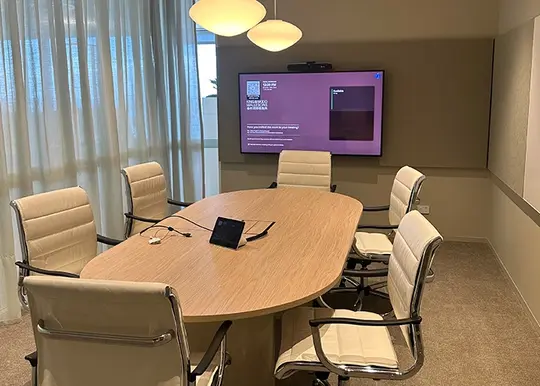
Modern workplaces depend on technology for presentations, team discussions and video conferencing. Professional audio visual (AV) installation brings displays, microphones, speakers, cameras and connectivity solutions together in a system designed for business needs. For organisations planning an office upgrade, AV installation Sydney services can help create meeting spaces that support clear communication and more efficient collaboration.
Understanding the available equipment, installation process and room requirements makes it easier to choose an appropriate solution for your workplace.
What Is Included in Professional AV Installation?
Professional AV installation involves planning, supplying, installing and configuring audio visual equipment to suit a particular environment. The exact components depend on the room size, intended use and existing technology.
Common components include:
Commercial displays: Screens for presentations, training sessions, digital content and video meetings.
Audio systems: Speakers, microphones and other equipment that support clear sound throughout the room.
Video conferencing equipment: Cameras and compatible audio devices for communication with remote participants.
Connectivity solutions: Cables, connection panels and wireless presentation options for compatible devices.
Control systems: User-friendly controls for managing displays, audio and connected equipment.
A properly planned installation considers how these components work together rather than treating each device as a separate purchase.
Which Businesses Need Audio Visual Installation?
Audio visual technology supports a range of commercial environments. Equipment requirements vary according to the activities performed in each space.
Office Meeting Rooms
Small meeting rooms typically require a display, camera, microphone and speaker system. Wireless presentation options or suitable connection points can help employees share information without complicated setup procedures.
Boardrooms and Conference Facilities
Larger rooms may need multiple displays, ceiling microphones, integrated speakers and advanced video conferencing systems. Equipment placement is particularly important for maintaining clear sound and ensuring participants can see presentation material.
Training Rooms and Commercial Facilities
Training environments often benefit from larger displays, presentation equipment and audio systems that help participants follow demonstrations. The setup should suit the room layout, audience size and type of content presented.
How Does the AV Installation Process Work?
A structured installation process helps ensure that equipment suits the space and performs as expected.
1. Assess the Room and Business Requirements
The first step is to understand how the room will be used. Room dimensions, seating arrangements, lighting, existing cabling and the number of participants all influence equipment selection.
2. Select Compatible Equipment
Displays, cameras, microphones and speakers must work with the devices and software used by the business. Checking compatibility before purchasing equipment helps minimise connection problems and unnecessary costs.
3. Install and Configure the System
Installation may involve mounting displays, positioning cameras, connecting audio equipment and organising cables. Any wall or ceiling mounting should account for structural requirements, equipment weight and safe installation practices.
4. Test the Equipment
Testing confirms that displays, microphones, speakers and conferencing devices function correctly. The process should also check connection stability, audio levels and the ease of operating the system.
A clear handover helps staff understand how to start meetings, share presentations and use the installed equipment.
How to Choose the Right Meeting Room AV Equipment
Choosing suitable equipment requires more than comparing prices or selecting the latest technology. The system should match the actual needs of the workplace.
When evaluating options, consider these factors:
Room dimensions: Choose displays and audio equipment appropriate for the space.
Sound quality: Ensure participants can hear discussions without excessive background noise or distracting echoes.
Video quality: Select cameras and displays suited to the room layout and meeting requirements.
Device compatibility: Check connections with business laptops, conferencing platforms and existing systems.
Ease of use: Look for straightforward controls that minimise setup time.
Future flexibility: Consider whether the system can accommodate additional users or changing meeting requirements.
Businesses should also review installation, configuration and ongoing maintenance requirements when comparing proposals. A lower initial price may not represent the best overall value if the equipment is difficult to operate or unsuitable for the room.
What Are the Benefits of Professional AV Installation?
A professionally planned audio visual system can improve the experience of everyday meetings and presentations.
Clearer communication: Appropriate microphones, speakers and cameras help participants follow discussions, including during hybrid meetings.
Better collaboration: Integrated presentation tools allow staff to share documents, visuals and other information more conveniently.
Simpler operation: Proper configuration and consistent controls can reduce the time spent troubleshooting connections before meetings.
Effective use of space: Equipment selected for the room can support presentations and discussions without creating unnecessary clutter.
Room for future upgrades: Scalable solutions can make it easier to adapt workplace technology as business needs change.
These benefits depend on appropriate equipment selection, correct installation and regular checks of the system.
Common AV Installation Mistakes to Avoid
Poor planning can lead to unnecessary expenses and ongoing technical difficulties. Businesses should avoid selecting equipment without considering room dimensions, overlooking microphone placement or assuming all devices will work together automatically.
Cable management and mounting safety also deserve attention. Untidy connections can make maintenance more difficult, while unsuitable mounting arrangements can create safety risks.
Another common issue is overlooking staff training. Even a well-designed system may be underused if employees do not understand its controls. Testing the complete setup and providing basic operating instructions can help address this problem.
Frequently Asked Questions
How long does AV installation take?
Installation time depends on room size, equipment complexity, cabling requirements and the condition of existing infrastructure. A simple meeting room setup may take less time than an integrated boardroom system. A site assessment helps establish a more accurate timeframe.
How much does commercial AV installation cost in Sydney?
Costs vary according to equipment selection, installation complexity, mounting requirements, cabling and system integration. Businesses should request an itemised quotation based on their room layout and operational needs rather than relying on a general estimate.
Can existing AV equipment be reused?
Existing displays, speakers and other devices may be suitable for reuse if they are compatible with the proposed system and meet current requirements. An assessment can identify which components remain practical and which may need upgrading.
Is professional AV installation suitable for small meeting rooms?
Yes. Small meeting rooms can benefit from appropriately sized displays, conferencing cameras, microphones and straightforward connectivity. The system should match the number of users and the type of meetings conducted.
Conclusion
Choosing an appropriate audio visual system starts with understanding how a workplace operates, which devices staff use and what each room needs to achieve. Careful planning, compatible equipment, safe installation and thorough testing can help businesses establish meeting environments that support communication and collaboration.
Genconnect Technologies provides business technology solutions, including audio visual installation, connectivity and meeting room technology. Businesses planning a new conference room or upgrading existing equipment can explore suitable solutions based on their workspace, technical requirements and future needs.
Tags : AV Installation