What Happens If Invoice Timestamp and QR Code Data Don’t Match in ZATCA?
By Rahman Iqbal 06-07-2026 73
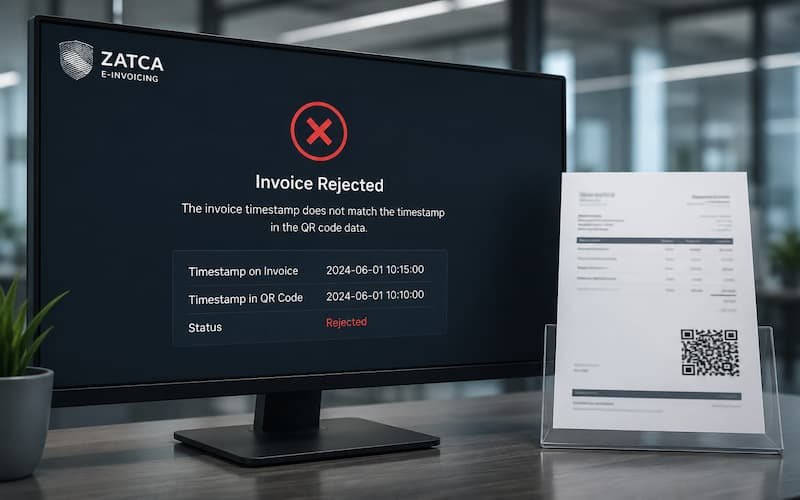
In recent years, E-invoicing in Saudi Arabia has become a major step toward digital transformation and tax compliance under the Zakat, Tax and Customs Authority (ZATCA). Businesses are now required to generate structured electronic invoices with strict technical standards, including QR codes, cryptographic stamps, and accurate timestamps. One of the critical compliance risks businesses face is when the invoice timestamp and QR code data do not match. This may seem like a small technical issue, but in ZATCA’s system, even minor inconsistencies can lead to serious consequences.

Understanding ZATCA’s Invoice Validation Requirements
ZATCA’s e-invoicing system is designed to ensure transparency, prevent tax evasion, and maintain real-time verification of transactions. Every tax invoice must include:
A precise invoice issuance timestamp
A machine-readable QR code (for simplified tax invoices, especially in B2C)
Cryptographic stamp or digital signature (Phase 2 requirements)
Consistent invoice data across all embedded and visible fields
The QR code is not just a visual element. It encodes critical invoice data such as seller details, VAT amount, total invoice value, and timestamp. ZATCA systems verify this encoded information against the actual invoice data submitted or stored in the system.
When the timestamp on the invoice does not match the timestamp embedded in the QR code, it raises an immediate red flag in compliance validation.
What Does a Timestamp and QR Code Mismatch Mean?
A mismatch occurs when the invoice generation time recorded in the system differs from the time encoded in the QR code data. This inconsistency can happen in several ways:
The invoice shows one issuance time, but the QR code contains a different one
System clock errors lead to incorrect timestamp generation
Middleware or ERP software generates delayed QR encoding
Manual edits or reprocessing of invoices after QR generation
Synchronization issues between billing and e-invoicing systems
Even a small difference of a few minutes can be detected during validation checks, especially under Phase 2 clearance and integration requirements.
What Happens When There Is a Mismatch?
When ZATCA detects inconsistency between invoice timestamp and QR code data, the consequences can vary depending on severity and frequency.
1. Invoice Rejection (Real-Time or Post-Validation)
In Phase 2 compliance, invoices are validated either in real time or near real time. If a mismatch is detected:
The invoice may be rejected at the clearance stage
The taxpayer may receive an error response from ZATCA APIs
The invoice is considered non-compliant until corrected
This means the invoice may not be legally valid for VAT reporting purposes until it is fixed and reissued.
2. Compliance Flagging and Audit Risk
Repeated mismatches can trigger compliance monitoring alerts within ZATCA systems. This may result in:
Flagging of the taxpayer’s account for audit review
Increased scrutiny of future invoice submissions
Requests for historical invoice reconciliation
ZATCA uses automated systems to detect anomalies, and timestamp inconsistencies are considered a sign of system malfunction or potential manipulation.
3. Penalties for Non-Compliance
If the issue is found to be recurring or intentional, businesses may face penalties under Saudi VAT regulations. These penalties can include:
Fines for non-compliant invoice issuance
Penalties for failing to adhere to technical e-invoicing requirements
Additional scrutiny during tax audits
Even if the mismatch is unintentional, businesses are still responsible for ensuring compliance through proper system configuration.
4. Disruption in Business Operations
Operationally, invoice mismatches can create significant disruptions:
Delays in invoice approval and delivery to customers
Disputes with buyers due to invalid or inconsistent invoices
Accounting reconciliation issues
Cash flow delays due to rejected invoices
For businesses operating at scale, even small technical errors can snowball into major operational inefficiencies.
5. Impact on VAT Reporting Accuracy
Since VAT returns depend on accurate invoice data, mismatched timestamps can lead to:
Incorrect reporting periods
Misalignment between sales records and tax submissions
Errors in VAT liability calculations
This increases the risk of discrepancies during ZATCA audits.
Why Do These Mismatches Happen?
Understanding the root causes is essential to preventing them. Common reasons include:
1. System Clock Desynchronization
If ERP systems, billing software, or servers are not synchronized with a standard time source, invoice timestamps may differ from QR encoding time.
2. Integration Errors
Many businesses use third-party invoicing solutions integrated with ERP systems. Poor API integration can lead to delays or mismatched data transmission.
3. Latency in Invoice Generation
In high-traffic systems, invoice creation and QR generation may not occur simultaneously, causing slight differences in recorded timestamps.
4. Manual Interventions
Any manual editing of invoices after QR generation can create inconsistencies that ZATCA systems easily detect.
5. Software Misconfiguration
Incorrect setup of e-invoicing modules or outdated software versions can lead to mismatched data formatting.
How ZATCA Detects These Issues
ZATCA uses advanced digital validation mechanisms to ensure invoice integrity:
Real-time API validation for Phase 2 taxpayers
Cryptographic hash verification to ensure invoice authenticity
Cross-checking QR code data with submitted invoice payloads
Timestamp consistency checks across multiple data points
Machine learning models to detect abnormal invoice patterns
Because of this multi-layered validation, mismatches are rarely missed and are flagged almost immediately.
How Businesses Can Prevent Timestamp and QR Code Mismatches
Preventing this issue requires a combination of technical discipline and system optimization.
1. Synchronize System Time
Ensure all servers, POS systems, and ERP platforms are synchronized with a reliable NTP (Network Time Protocol) server.
2. Use Certified E-Invoicing Solutions
Adopt ZATCA-approved e-invoicing systems that are compliant with Phase 1 and Phase 2 requirements.
3. Strengthen API Integration
Ensure that invoice generation and QR code creation happen in a single transaction flow to avoid delays or mismatches.
4. Regular Software Updates
Keep invoicing software updated to comply with the latest ZATCA technical specifications.
5. Conduct Internal Audits
Regularly audit sample invoices to check for QR code accuracy, timestamp alignment, and data consistency.
6. Implement Error Logging Systems
Use logging mechanisms to track invoice creation steps and identify where mismatches may occur.
Correcting a Mismatch When It Occurs
If a mismatch is detected, businesses should act quickly:
Re-generate the invoice with corrected timestamp alignment
Cancel the incorrect invoice if required under ZATCA rules
Resubmit through the correct e-invoicing channel
Document the issue for internal compliance records
Notify accounting teams to adjust VAT records if necessary
Prompt correction helps minimize compliance risk and avoids escalation.
Conclusion
A mismatch between invoice timestamp and QR code data may seem like a minor technical glitch, but under ZATCA’s strict e-invoicing framework, it is treated as a significant compliance issue. It can lead to invoice rejection, audit risks, penalties, and operational disruptions. Businesses must ensure their systems are properly synchronized, integrated, and compliant with ZATCA standards to avoid such issues.
As digital taxation continues to evolve, accuracy and real-time consistency are no longer optional—they are mandatory requirements for maintaining compliance and ensuring smooth financial operations in Saudi Arabia’s e-invoicing ecosystem.
Tags : E-invoicing in Saudi Arabia