ViceVersa Tools: The Complete Guide to Email Format Conversion Across 10 Format Categories
By ViceVersa Tools 09-09-2026 16
Let’s Get Started
Look, every It admins hits this moment somewhere. You’re sitting in a meeting and someone says “we need to migrate from Lotus Notes” or “help the team still has PST files sitting on their desktop” or “we’re finally moving to Office 365.” And then comes the part that makes everyone quiet: “How do we actually move the data without losing anything?”
That’s when email format conversion stops being abstract and becomes your problem.
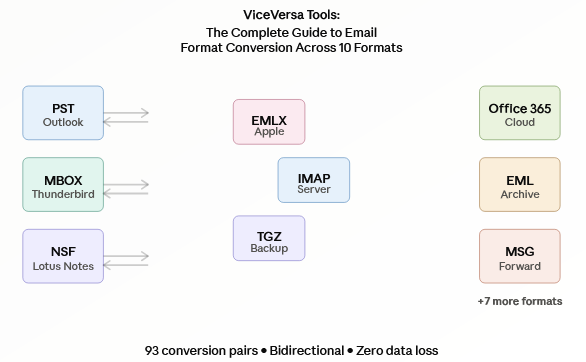
ViceVersa Tools deals with 93 different conversion pairs across 10 email formats. Let’s talk about what actually shows up in your inbox and why it matters.

The 10 Formats You’ll Definitely Encounter
EML (Electronic Mail format)
EML is in all the unexpected places. Somebody has gmail archived as EML files. Compliance requests arrive as a folder of EML messages. A user from 10 years ago has been saving important emails as files. EML is plain text, portable, durable. Great for archiving, terrible for bulk migration because one file per message. If you need to move 5,000 EML files somewhere, doing them one by one is how you end up asking to work from home just to disappear.
EMLX (Apple Mail file format)
Mac EMLX stores at. It's essentially Apple's take on EML with some changes that only Apple understands. If you're in a mixed environment, some Mac users, some Windows, then EMLX is there whether you want it or not. And of course it's a bit at odds with everything else.
MSG (Microsoft Outlook Message File)
The MSG is the file you get when someone in Outlook clicks “Save As” on an email. That’s how forwarded emails look sometimes too. It’s a single message, but it has all the Outlook metadata. When you have a lot of MSG files that need to be imported, that's when bulk conversion is your friend and not your nightmare.
MBOX (Mail Box Format)
Thunderbird uses mbox. That's what Gmail spits out when you export. It’s a big file with multiple messages, totally different than EML. If your team has been running Thunderbird forever and finally standardizing on Outlook, MBOX is the bridge between “what you had” and “where you’re going.” Gmail exports also come through as MBOX which catches people off guard .
PST (Personal Storage Table)
PST is the mailbox format of Outlook, and if you’ve worked in enterprise IT, you’ve dealt with PST. Users have PST files locally for archiving. Outlook makes PST files. Old systems export to .pst. In most organizations, PST conversion is not a matter of if, but when. And PST files are big, which is a problem in itself.
NSF (Notes Storage Facility)
NSF is the Lotus Notes format. If your company ever had any relationship to Notes (and lots of mid-size and enterprise organizations did) you've got NSF lying around. Notes expires, data does not. NSF conversion is generally a case of "we're finally moving off Notes and onto something modern."
TGZ (Compressed Tape Archive)
TGZ comes from Unix and Linux mail servers. It’s squashed, not Windows admin-friendly, and it shows up when you’re pulling email from server backups or legacy mail appliances. The majority of people stumble across TGZ by accident. It’s like discovering an old format in the back of a cabinet.
IMAP (Internet Message Access Protocol)
The phrase “convert IMAP” is usually referring to a mailbox residing on an IMAP server — Gmail, ProtonMail, a custom mail server somewhere. Converting to IMAP is usually the first step to getting mail off a server and into your infrastructure. You're taking the mailbox away and putting it somewhere else.
Office 365 (Exchange Online Mailbox)
Most migrations are to Office 365 now. The destination for data could be Office 365, PST files, old mail servers or legacy email systems. Its cloud based, its where enterprises are going, and moving to Office 365 means moving from legacy formats to modern cloud mailboxes.
Mozilla Thunderbird
Thunderbird is the open source email client for when you’ve had enough of Outlook. Internally it is MBOX, but "Thunderbird conversion" usually means extracting the mailbox from the Thunderbird data folder and putting it elsewhere. Typically Office 365 or Outlook.
Conversions That Actually Solve Your Real Problems
Not all 93 pairs are created equal. These will cover probably 80% of what admins need to actually do:
EML ↔ PST
You have Outlook PST files and you want them as single EML files (or vise versa). PST files grow large, splitting PST files to EML lets you split them into smaller chunks that are easier to handle.
MBOX ↔ PST
Thunderbird shops moving to Outlook or Gmail exports that have to be Outlook mailboxes. Bulk conversion means you don’t spend days doing this file by file.
PST ↔ NSF
The conversion of Notes to Outlook. If you are moving away from Lotus Notes, this is the way the mailboxes transfer.
IMAP ↔ Office 365
Contemporary migrations. You pull mailboxes from Gmail, custom mail servers, or hosted email and move them into Office 365. This is what most organizations are doing today.
EML ↔ Office 365
Archive folders with EML files to restore to live mailboxes or Office 365 exports for long-term archiving.
Office 365 ↔ PST
Users with local PST files migrating to the cloud or exporting Office 365 for backup as PST.
MSG & All Types
To combine dispersed MSG files from forwarding and old workflows into a single mailbox format.
EMLX ↔ PST or Office 365
Mac users or Apple Mail archives moving to Windows infrastructure or cloud
TGZ ↔ PST
Server backups as TGZ that need to be restored to Outlook.
NSF ↔ IMAP or Office 365
Notes infrastructure going directly to cloudmail.
Why Bidirectional is Important
What makes ViceVersa Tools different from most other converters is that most tools are one-way. You export to PDF or EML and then you are stuck, you cannot import it back. That’s fine for archiving, but not for migration.
Bidirectional means both PST to EML and EML back to PST work. The data is intact both ways. That matters because real migrations are not always perfectly linear. Sometimes you have to try the conversion first, see that the output is okay, and then commit. Sometimes data needs to be moved back and forth between formats. One-way converters trap you. Bidirectional gives flexibility.
How To Think About Your Conversion Problem
Before you choose a conversion path, ask yourself:
- Where does the data currently reside? PST? MBOX? An IMAP server?
- Where does it really need to be? Office 365? Outlook? An EML archive?
- How much are we talking about here? 50 files or 5000?
- Are the attachments and folder structure supposed to survive? They should. Always.
- Is this a one-time thing or will you have to do this again? That's another way to do it.
Most real-world migrations follow one of these patterns:
You’re moving from something old to Office 365. Lotus Notes, IMAP servers, local PST files, everything going to the cloud. You’re turning your platform Thunderbird shops going full bore on Outlook Mac shops joining a Windows infrastructure. You are archiving and organizing, converting PST files to EML for compliance or Office 365 to EML for cold storage. You’re cleaning up after a mess. Restoring from TGZ backups, consolidating scattered EML archives. You’re consolidating formats, you’ve got MSG files all over the place, EML exports lying around, and you need one coherent mailbox format.
What Happens When You Don’t Convert Correctly
I’ve seen what happens when teams try to avoid proper conversion tools:
Attachments disappear. Half-baked converters drop files. Custom scripts. Users migrate and then ask “where are my attachments?” Collapse folder structure The conversion didn’t preserve the hierarchy so everything ends up in Inbox. Email headers, read status, flags, timestamps are scrambled. Admins then have to "fix" emails individually rather than bulk-process. You spend three days doing a conversion that should take three hours because you're doing it one file at a time instead of bulk.
Proper conversion means: pick the right format pair, do it as a bulk operation, preview the output before you commit, then move on. It’s not complicated, but it’s important.
Where You Start
You probably know what your problem is. If you don't here is how to figure out what conversion you really need
You’re moving to Office 365 and your users have PST files sitting on desktops they’ve been archiving locally? You require PST to Office 365. So your company finally is getting rid of Lotus Notes and moving to modern infrastructure? NSF to PST or NSF to Office 365, depending on whether you’re going desktop or cloud. If your team uses Outlook but you get exports from Gmail as MBOX files? MBOX to PST Conversion. Do you have years of email archives sitting in individual EML files that you need to restore to a live mailbox? Office 365 to EML. Your Mac team is moving to Windows and Outlook? EMLX to PST Converter. You have a server backup in a compressed TGZ file and need it in something usable? TGZ to PST.
Everything else is edge cases and special cases. Pick the pair that corresponds to your real problem, run it once, and off you go. That's really all.
The take away
The email formats are just packaging. They’re the way your email system stores your data. Conversion is simply transferring data from one container to another without losing anything in the process. It's not mysterious, it's a solved problem. All you need to do is find the right tool for your specific conversion.
That’s what ViceVersa Tools does. Pick your format pair, do the conversion, keep your data intact and get on with your day.