The rapid development of technology has created more flexible and efficient ways to connect electronic devices. USB (Universal Serial Bus) has become one of the most widely used connectivity standards for data transfer and device communication. Among the different USB connectors available today, USB-C has gained significant popularity because of its compact design, reversible connector, and broad compatibility.
While USB-C is now commonly found on modern laptops, desktops, tablets, and smartphones, many established devices still use older USB connector types. Printers are a common example, with many models featuring a USB-B port for wired communication.
This is where a USB-C to USB-B printer cable becomes useful. It allows a modern computer with a USB-C port to connect directly to a printer equipped with a USB-B port. This guide explains the different USB connectors, how USB-C to USB-B printer cables work, their benefits, important buying considerations, and why they remain useful in today's changing technology environment.
What Are the Different Types of USB Connectors?
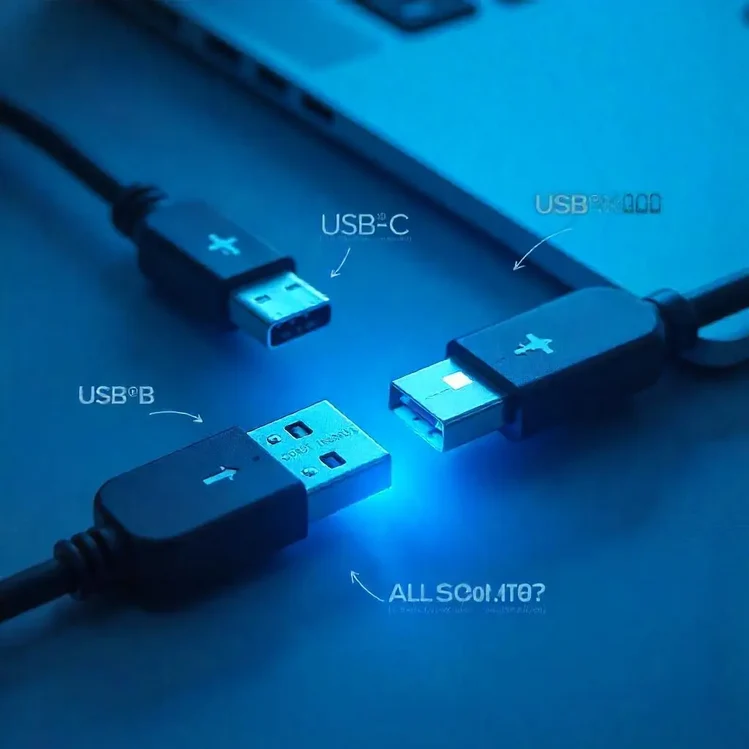
Before understanding a USB-C to USB-B connection, it is helpful to know the main USB connector types.
USB-A
USB-A is the traditional rectangular USB connector commonly found on desktop computers, older laptops, hubs, and power adapters. It has been widely used for connecting peripherals such as keyboards, mice, USB drives, and other accessories.
Although USB-A remains common, many newer devices are gradually moving toward USB-C.
USB-B
USB-B is commonly associated with printers, scanners, and other larger peripheral devices. Its distinctive square-shaped design with slightly beveled upper corners helps provide a secure connection.
Many printers still use USB-B as their device-side connection, making it an important connector for wired printing.
USB-C
USB-C is a smaller, reversible connector designed for modern electronic devices. Unlike USB-A and USB-B, it can be inserted in either orientation, making it more convenient to use.
USB-C is now widely used on laptops, smartphones, tablets, monitors, docking stations, and other modern devices. Depending on the device and USB specification, USB-C can support data transfer, charging, display connectivity, and other functions.
As more computers move away from traditional USB-A ports, users need practical ways to connect older peripherals such as USB-B printers.
Why Is a USB-C to USB-B Printer Cable Important?
Technology does not change all at once. Many users continue to use reliable printers purchased several years ago, even after upgrading to a modern laptop or computer.
A USB-C to USB-B printer cable provides a simple solution by connecting the USB-C port on a compatible computer to the USB-B port on a printer. This can eliminate the need for a separate USB-A adapter in setups where the computer does not have a USB-A port.
1. Connect Modern Computers to Existing Printers
One of the biggest advantages is compatibility. If your laptop has USB-C ports while your printer has a USB-B port, the appropriate cable can create a direct wired connection between the two devices.
This means you may continue using a perfectly functional printer instead of replacing it simply because your new computer uses a different connector.
2. Convenient and Simple Setup
A direct cable connection can be convenient for home offices, classrooms, and workplaces. Instead of using multiple adapters or dongles, users can choose a cable with USB-C on one end and USB-B on the other.
This keeps the setup straightforward and reduces the number of accessories required.
3. Useful for Modern Laptop Users
Many modern laptops have a limited number of ports and may rely heavily on USB-C. Users who need to connect older printers or other USB-B peripherals can benefit from having the appropriate cable available.
It is particularly useful for professionals who regularly print documents from newer laptops.
4. Helps Extend the Life of Older Devices
Replacing a computer does not necessarily mean that all connected peripherals need to be replaced. A suitable cable can help users continue using existing equipment.
This can be practical for businesses, schools, home offices, and individuals who want to get more value from their existing printers.
Does USB-C to USB-B Provide Faster Data Transfer?
Data transfer performance depends on the USB standards supported by the devices and the cable. The physical USB-C connector itself does not automatically guarantee a particular speed.
For example, USB 2.0 connections can support data rates of up to 480 Mbps under the appropriate conditions. Some USB-C implementations support substantially higher speeds, but the actual performance of a printer connection depends on the printer, computer, cable, and supported USB specification.
Printers generally do not require extremely high data-transfer speeds for everyday document printing. However, using a properly specified cable can provide a reliable connection for transferring print data between compatible devices.
Therefore, buyers should check the specifications of both the printer and computer rather than assuming that every USB-C cable provides the same performance.
How Do You Choose the Right USB-C to USB-B Printer Cable?
Selecting the correct cable involves more than simply checking the connector shape. Consider the following factors before making a purchase.
1. Check Connector Compatibility
First, identify the ports on both devices.
Your computer should have a compatible USB-C port, while your printer should have a USB-B port. Make sure you are purchasing a USB-C-to-USB-B cable rather than a USB-C-to-USB-A cable.
Checking the ports before ordering can help prevent compatibility issues.
2. Choose the Right Cable Length
Cable length should match your workspace. A cable that is too short may not comfortably reach from your computer to the printer, while an unnecessarily long cable can create clutter.
Measure the approximate distance between your devices before purchasing. For a desk setup, a shorter cable may be sufficient, while larger workspaces may require additional length.
3. Consider Build Quality
Cable construction can affect durability and long-term usability. Look for features such as reinforced connectors, flexible outer insulation, quality internal conductors, and suitable shielding.
A well-constructed cable can withstand repeated plugging and unplugging better than a poorly made alternative.
4. Check the Supported USB Standard
If data transfer performance is important, check the USB specification supported by your printer and computer.
Remember that the overall connection speed is determined by the slowest component in the setup. A high-speed cable cannot make a printer operate beyond the speed supported by its hardware and USB interface.
5. Consider Brand and Product Reliability
When purchasing connectivity accessories, product quality matters. Choose products from established manufacturers or sellers with clear specifications and reliable customer feedback.
Reviews can also provide useful information about connector fit, cable flexibility, durability, and compatibility with different devices.
What Are the Benefits of USB-C Connectivity?
USB-C has become an important part of modern device design because it provides a compact and versatile physical connector.
Compact Design
USB-C is smaller than traditional USB-A connectors, making it suitable for thin laptops, tablets, smartphones, and other compact devices.
Reversible Connection
One of its most convenient features is the reversible connector. Users do not need to check which side is facing upward before inserting the plug.
Broad Device Adoption
USB-C is increasingly found across different categories of electronics. This growing adoption makes USB-C accessories useful for modern computing environments.
Multiple Capabilities
Depending on the implementation, USB-C can support data transfer, charging, display output, and other functions. However, not every USB-C port supports every feature, so device specifications should always be checked.
Can a USB-C to USB-B Cable Reduce Electronic Waste?
Connectivity accessories can contribute to longer device lifecycles by helping users continue using existing peripherals with newer computers.
For example, if an older printer still works properly but a new laptop only provides USB-C connectivity, a suitable cable may allow the printer to remain in use.
Extending the useful life of electronics can reduce the need for premature replacement. This can also help reduce the amount of electronic waste generated when functional devices are discarded simply because of changing connector standards.
Where Can You Use a USB-C to USB-B Printer Cable?
A USB-C to USB-B connection can be useful in several environments.
Home Office
Users working from home can connect a modern laptop directly to a compatible printer for everyday documents, forms, invoices, and other printing requirements.
Business Offices
Employees can connect compatible computers to existing printers without necessarily replacing established office equipment.
Educational Institutions
Schools, colleges, and training centers may continue using printers with USB-B ports while upgrading computers and laptops to newer models.
Personal Workspaces
For users with a modern laptop and an older printer, a suitable cable can provide a convenient wired connection without requiring additional adapters.
USB-C to USB-B Cable vs. USB-C Adapter: Which Is Better?
The right choice depends on the available ports and your setup.
A direct USB-C-to-USB-B cable provides a simple connection between a USB-C computer and a USB-B printer. It has fewer connection points and can help keep the workspace organized.
An adapter can be useful if you already own a USB-A-to-USB-B printer cable. In that case, a USB-C adapter may allow you to connect the existing cable to a USB-C computer.
However, using a direct cable can be more convenient when you regularly connect the same two devices.
Common Mistakes to Avoid When Buying a Printer Cable
Several simple mistakes can lead to purchasing the wrong cable.
Choosing the Wrong Connector
USB-C, USB-A, and USB-B connectors are different. Always verify both ends before purchasing.
Ignoring Cable Length
A cable that does not reach your printer comfortably can become inconvenient, especially when the devices are positioned far apart.
Assuming All USB-C Cables Are the Same
USB-C describes the connector shape, not necessarily the complete capabilities of the cable. Data speed, charging capabilities, display support, and USB specification can vary.
Buying Only Based on Price
The cheapest cable is not always the best choice. Consider construction quality, specifications, compatibility, and customer feedback.
Conclusion
A USB-C to USB-B printer cable provides a practical bridge between modern computers and printers that still use the traditional USB-B connection. As USB-C continues to become more common on laptops and other devices, these cables remain useful for maintaining compatibility with existing peripherals.
Before choosing a cable, check the ports on both devices, confirm the supported USB standard, select an appropriate length, and consider the build quality. A properly selected cable can provide a simple and reliable wired connection while helping you continue using your existing printer.
For home offices, businesses, students, and everyday users, the right USB-C to USB-B cable can make the transition to newer devices much easier—without requiring you to replace a functional printer simply because the connector technology has changed.