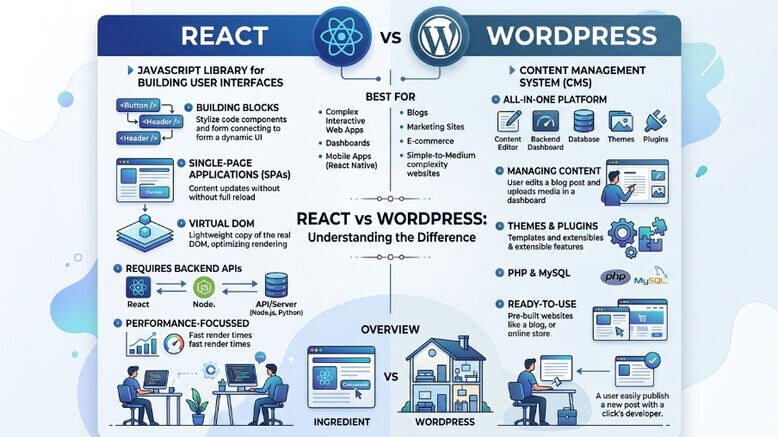
Choosing the right foundation for your website used to be simple: if you wanted a blog, you picked WordPress; if you wanted an app, you built it from scratch. But in 2026, the lines have blurred. I’ve seen developers build entire SaaS platforms on WordPress and marketers struggle to manage simple blogs built in React.
The React vs WordPress debate isn’t about which tool is "better" in a vacuum, it’s about which tool is better for your specific goals, your team’s skills, and your long-term budget. In this guide, I’m going to strip away the jargon and give you a straight-talk comparison of these two powerhouses so you can stop second-guessing and start building.
Understanding the Core Difference: Library vs. Ecosystem
Before we dive into the weeds, let's get our definitions straight.
WordPress is a Content Management System (CMS).
React, on the other hand, is a JavaScript library for building user interfaces.
Which is more popular in 2026
WordPress still powers a massive chunk of the web (over 40%), but React has become the industry standard for "interactive" web experiences.
Speed and Performance: The User Experience Factor
In the modern SEO landscape, Google’s Core Web Vitals are king. If your site is slow, you don't rank. Period.
React Performance: React excels at creating "Single Page Applications" (SPAs).
WordPress Performance: WordPress can be lightning-fast, but it’s easy to bloat.
The Verdict: If you want a highly interactive, "app-like" feel, React wins. If you want a standard content site that performs well with minimal custom dev work, WordPress is the safer bet.
Ease of Use and Content Management
This is where the "human" element of SEO comes in. Who is actually going to be hitting the "Publish" button every day?
The Marketer’s Dream: WordPress
WordPress was built for writers. The Gutenberg editor allows non-technical users to drag and drop blocks, embed videos, and tweak SEO settings via plugins like Yoast or Rank Math without ever seeing a line of code.
Developer’s Playground: React
With a standard React setup, there is no "back end" for a writer to log into. To change a headline, a developer often has to push a code update. To bridge this gap, we use Headless CMS (like Contentful or Strapi). This gives you the power of React with a WordPress-like editing interface, but it adds another layer of complexity and cost to your tech stack.
SEO and Discoverability in the AI Era
Google's 2026 algorithms prioritize E-E-A-T (Experience, Expertise, Authoritativeness, and Trustworthiness).
WordPress SEO: It’s "out-of-the-box" ready.
React SEO: This is where beginners often stumble. Because React is JavaScript-based, search engine bots sometimes struggle to crawl the content if it isn't "rendered" properly on the server.
Development Costs and Time-to-Market
Let’s talk money. I’ve seen many startups burn their entire seed round building a custom React site when a $50 WordPress theme would have done the job.
Feature | WordPress | React |
|---|---|---|
Initial Cost | Low to Medium | High |
Maintenance | Medium (Updates/Security) | High (Developer needed) |
Development Time | Days/Weeks | Months |
Customization | Limited by Theme/Plugins | Limitless |
If you need a site live by next Tuesday to test a business idea, choose WordPress. If you are building a proprietary platform that needs to scale to millions of users with unique functionality, invest in React.
Security: Keeping the Hackers Out
Because WordPress is the most popular platform on earth, it’s also the most targeted.
React sites are generally more secure by default.
Hybrid Approach: Best of Both
You don't always have to choose. In 2026, many of my clients use a Headless WordPress setup.
In this scenario, you use WordPress as your "back end" (where you write your posts) but use React as the "front end" (what the user actually sees). This gives your marketing team the easy editor they love, while your developers get to build a high-performance, modern interface. It’s more expensive to set up, but for mid-sized companies, it’s often the "sweet spot."
Final Thoughts: Which One is for You
After a decade in the SEO and web dev world, here is my honest breakdown:
Choose WordPress if:
You are a blogger, small business owner, or news outlet.
Content is your primary product.
You have a limited budget and need to manage the site yourself.
You want access to thousands of ready-made features via plugins.
Choose React if:
You are building a web application (like a dashboard, tool, or social network).
You have a dedicated budget for professional developers.
User interaction and state management (e.g., a complex checkout or a dynamic map) are more important than long-form articles.
You want absolute control over every single pixel and millisecond of load time.
Next Steps
Still not sure? My advice is to start by listing your "Must-Have" features. If 90% of them can be solved by a WordPress plugin, don't reinvent the wheel with React. But if you find yourself saying, "I want my site to behave exactly like [insert complex app here]," then it's time to hire a React expert.
Have questions about your specific project? Reach out to a technical SEO strategist to audit your plan before you write your first line of code. Making the right choice now will save you thousands of dollars in "re-platforming" costs two years down the road.
Tags : Reactjs wordpress web development