You need to open EML file in Outlook, but your computer is giving you a blank stare or a frustrating error message. It is a common problem. You have a pile of saved email files from another program, and now that you are using the Microsoft Outlook email client, you just want to read them.
Here is the good news: you can absolutely get these files into your Outlook mailbox. Whether you have a single email message file from a colleague or need to execute a massive email migration for thousands of archived messages, the process does not have to be painful.
Let's break down exactly how to open EML file in Outlook without losing your attachments, breaking your formatting, or pulling your hair out.
Understanding the Format Clash: EML vs. PST
Before fixing the issue, we should look at why this friction happens in the first place. An EML file is a standard email file format used by many platforms, including Thunderbird, Apple Mail, and older Windows Live Mail setups. It saves a single email, along with its text, headers, and attachments, into a neat little package.
Outlook, however, prefers its own way of doing things. It relies on the PST file format for local archives and the OST file for synchronized server data.
Is EML compatible with Outlook?
Technically, yes, but they don't always speak the same language right out of the box. Outlook can view individual EML files if you double-click them, but trying to permanently import EML file into Outlook so they sit nicely in your folders requires a bit more effort.
If you are dealing with a standard desktop email application, you need to convert or transfer these standalone files into a format that fits natively into your Outlook data file structure.
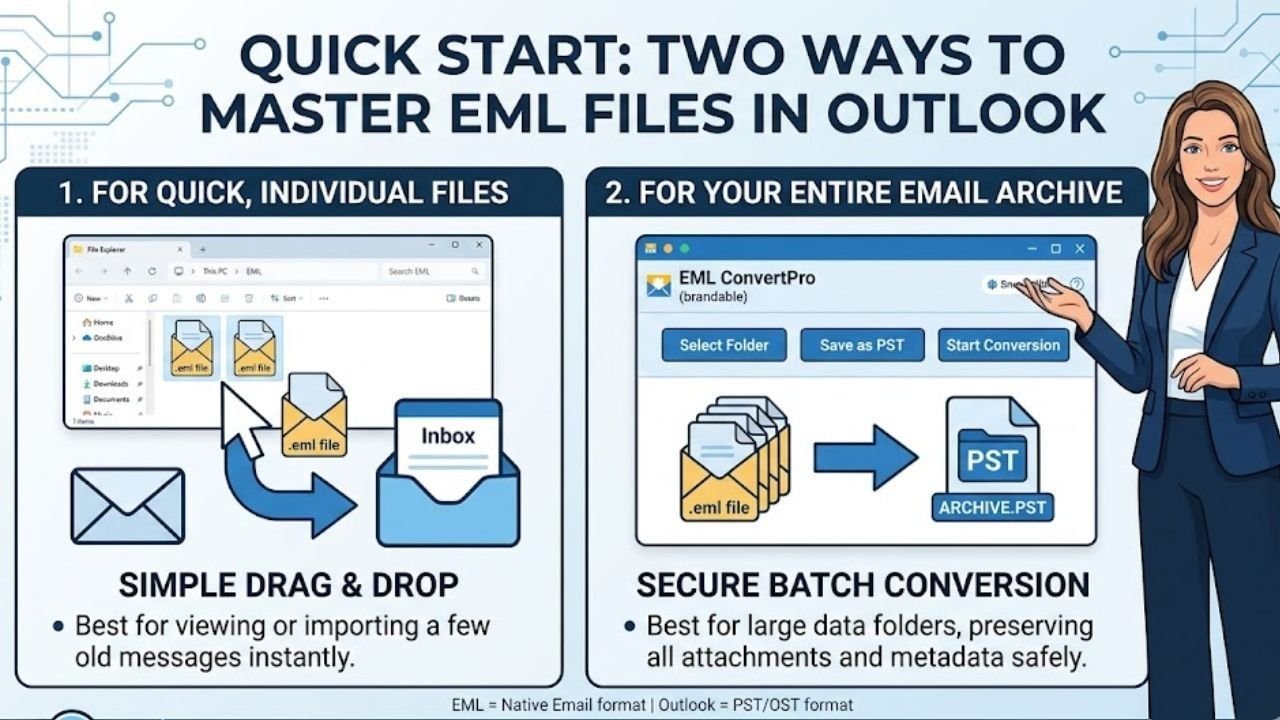
Method 1: The Classic Drag and Drop Trick
If you only have a handful of messages, the easiest way to open EML emails in Outlook is to use your mouse. This manual approach requires no special EML Converter or complex configurations.
Here is how to drag and drop EML files into Outlook:
- Open your Windows email client or file explorer and locate your EML files.
- Open Microsoft Outlook and make sure your inbox or a custom folder is visible on your screen.
- Select the EML files you want to move.
- Left-click, hold, and drag the files directly into the middle pane of your Outlook folder.
[Your Local Folder] ---- Drag & Drop ----> [Outlook Inbox Folder]
(Contains .eml files) (Changes to native Outlook format)
What this really means is that Outlook copies the data and recreates the message inside your active database. It is a quick fix to view EML files in Outlook when a friend sends you an old archive.
However, there is a catch. If you try to bulk open EML files in Outlook using this method—say, five hundred emails at once—Outlook will likely freeze. It can also strip out the original "Date Received" timestamp, changing it to the exact moment you dragged the file into the window. If keeping your historical records accurate matters to you, keep reading.
Method 2: Changing Your Default App Settings
Sometimes, you do not want to import the file; you just want to read what is inside. If you are asking what program opens EML files by default on your computer, Windows might be pointing to the wrong app. You can change this so Outlook handles them automatically.
Here is how to set up open EML in Outlook Windows defaults:
- Right-click on any .eml file on your computer.
- Hover over Open with and select Choose another app.
- Look for Microsoft Outlook in the list.
- Check the box that says Always use this app to open .eml files.
- Click OK.
Now, whenever you encounter an Outlook open EML attachment or a saved file on your hard drive, a simple double-click will launch it inside a standard Outlook reading window. This works perfectly for users trying to figure out how to open EML files in Outlook on Windows 11 without altering their current Outlook setup.
Method 3: The Manual Import via Windows Mail
If you are using an older machine or running a specific build, you can use the built-in Windows Mail application as a bridge to transfer EML to Outlook.
First, import your EML files into the default Windows Mail app by dragging them into its storage folders. Once they are inside, you can use the export feature to send that data directly to your active Outlook profile.
This path handles the mailbox migration process by converting the files behind the scenes. The downside? This strategy is becoming harder to use as Microsoft phases out older mail apps in favor of newer web-based versions. For users trying to solve how to open EML file in Outlook 365, this bridge method often runs into compatibility walls.
Why Is My EML File Not Opening in Outlook?
You try to open a file, and nothing happens. Or worse, you get a corruption warning. Why does this happen?
Here are the primary reasons for an email data import failure:
- Corrupted File Headers: If an email was improperly downloaded or cut off during a transfer, the file structure becomes unreadable.
- Large Attachments: Issues with email attachment management occur when the EML contains a file that exceeds Outlook's default size limits.
- Incorrect File Extensions: Sometimes files lose their extension names. Ensure the file ends exactly in .eml and not .eml.txt.
- Registry Blocks: Security updates within your corporate network might block raw email files from executing directly due to malware risks.
If you hit these roadblocks, manual fixes won't cut it. You will need a reliable way to fix the data structure before trying to add EML files to Outlook.
Method 4: Bulk Migrations Using Software
When you need to migrate EML to Outlook for an entire office, or you have years of archives to move, manual labor is out of the question. You need an automated system to handle the email file conversion without losing data.
Using a dedicated and professional EML to PST Converter tool is the safest route. These tools scan a folder filled with thousands of EML files, fix broken metadata, and pack them all into a single, clean file format.
Managing Your Email Archives Safely
An email archive transfer requires care. Emails are not just plain text; they contain digital signatures, tracking headers, and embedded images.
When you use an Outlook EML import tool or run a manual EML email import Outlook routine, always keep a backup copy of your original files. Never run a conversion or a destructive move on your only copy of the data. If a power outage or application crash happens mid-transfer, your source files could become corrupted.
Keep your files organized in small batches. Instead of running a how to import multiple EML files into Outlook process on 50,000 items at once, break them down by year or department. It keeps your system fast and makes troubleshooting way easier if an error pops up.
Quick Reference: Solving Your EML Questions
Let's look at the most common questions users ask when dealing with these file types.
How do I open multiple EML files in Outlook?
The fastest way without software is to select all the files in Windows File Explorer and drag them into an open Outlook folder. If you have hundreds of files, use a dedicated EML to Outlook import application to avoid system crashes.
Why can't Outlook open EML files natively sometimes?
This usually stems from a corrupted file or an outdated desktop email application configuration. If your file associations are broken, Outlook won't recognize the email message file, requiring you to reset your default application settings in Windows.
Can I convert EML directly to an Outlook data file?
Yes. You can use email conversion software to transform raw EML data directly into a PST file format. Once converted, you simply open the PST file inside Outlook to access all your old folders and messages instantly.
Summary
Getting your old messages into your current workspace does not require a degree in computer science. For a few quick files, stick to the drag and drop EML to Outlook method or update your default open settings. If you are facing a massive email client compatibility project, save yourself time and data loss by using a reliable convert EML to Outlook format utility. Take it one step at a time, backup your data, and your archive will be organized in no time.
Tags : .....