Email remains one of the most common ways businesses communicate, share documents, and handle sensitive information. Unfortunately, it is also frequently used for phishing, impersonation, fraud, and malware delivery. A suspicious message may appear to come from a colleague, customer, supplier, or trusted organization while hiding warning signs underneath the surface.
Knowing what to examine can help you distinguish an unusual email from a potentially harmful one. Instead of immediately deleting the message or clicking through to investigate it, follow a structured process that preserves the original evidence and examines the message from different angles.
Why a Suspicious Email Needs Careful Examination
Not every unusual email is malicious. A message may contain an unfamiliar link or a slightly different sender address because of a legitimate business reason. Similarly, poor grammar or an unusual writing style alone does not establish that a message is fraudulent.
The important question is whether several pieces of evidence point toward the same conclusion.
For example, an email requesting an urgent payment deserves closer attention when the sender address looks slightly different from the normal address, the Reply-To address points elsewhere, and the included link leads to an unexpected domain.
This is why an investigation should consider the complete context instead of relying on one obvious warning sign.
Preserve the Original Message First
Before examining a suspicious email, preserve the original message whenever possible. Avoid replying to the sender simply to confirm whether the email is genuine. Do not click unfamiliar links or open unexpected attachments just to see what they contain.
A screenshot may show what appeared in the inbox, but it does not necessarily provide all the technical information contained within the original message.
Preserving the message gives you something reliable to examine later and can become particularly important if the email is eventually connected to a security or forensic investigation.
Examine the Sender Carefully
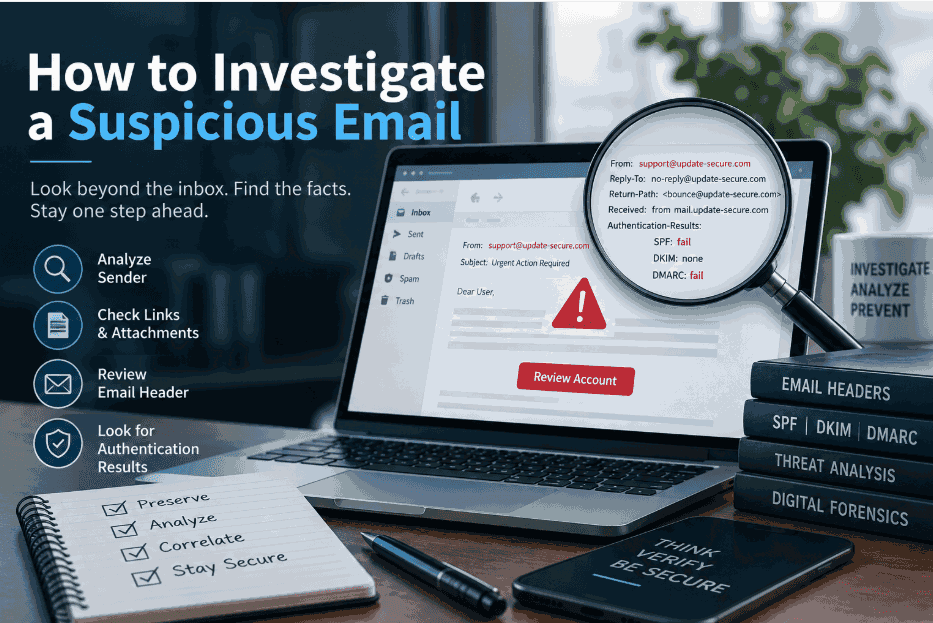
The sender's display name is one of the easiest elements to manipulate. An attacker may use the name of an employee, executive, vendor, or familiar company while using a completely different email address.
Look at the actual sender address rather than relying on the name shown in the inbox. Check the domain carefully for unexpected characters, spelling variations, or unfamiliar domains.
The Reply-To address can provide another useful clue. If replies are directed to an address that differs from the apparent sender, investigate why that difference exists before interacting with the message.
However, a different Reply-To address is not automatically proof of malicious activity. It should be considered alongside the other evidence.
Inspect Links Without Opening Them
Links are another important part of an email investigation. A message may display text that appears to point to a legitimate website while the underlying URL leads somewhere completely different.
Instead of clicking the link, inspect its destination first. Look for unfamiliar domains, unusual subdomains, unexpected redirects, or addresses that do not correspond with the organization mentioned in the message.
Consider the context as well. A sudden request to verify a password, update payment information, or access an unfamiliar document deserves additional scrutiny, particularly when it arrives unexpectedly.
The objective is to understand where the message is attempting to take the recipient without unnecessarily exposing the normal workstation or account.
Treat Attachments With the Same Caution
Attachments can also contain important clues. Consider the filename, extension, source, and reason the file was sent.
An unexpected document, executable file, compressed archive, or other unusual attachment should not be opened simply to determine whether it is safe. If the attachment is relevant to an investigation, it should be handled using an appropriate analysis environment and investigation procedure.
The surrounding email can also provide context. Ask whether the attachment was expected, whether the sender normally communicates this way, and whether the message contains an unusual request.
Examine the Email Header
The visible email body is only one part of the evidence. The email header contains technical information about the message and its delivery.
Important fields can include From, Reply-To, Return-Path, Received, Message-ID, and Authentication-Results.
The Received information can help investigators understand the servers and systems involved in delivering the message. Message-ID values can also be useful when correlating related messages.
Header analysis does not automatically reveal the complete identity of an attacker, but it can uncover inconsistencies that are difficult to see from the normal inbox view.
Consider SPF, DKIM, and DMARC Results
Email authentication results provide another layer of information.
SPF helps determine whether a sending host is authorized for the relevant domain. DKIM uses a cryptographic signature associated with a domain, while DMARC evaluates domain alignment and authentication results according to the domain's policy.
These mechanisms are useful evidence, but they should not be treated as a simple safe-or-dangerous indicator.
For example, an authentication result may tell you something about the sending infrastructure or domain alignment without proving that the person behind the message is trustworthy. Authentication findings should therefore be interpreted together with the sender information, header data, message content, and surrounding circumstances.
Connect the Evidence
Once the individual elements have been examined, bring them together.
Suppose an email uses the name of a familiar company, arrives unexpectedly, creates urgency, contains a slightly unusual sender address, and directs the recipient to a different domain. Each clue may have an innocent explanation when considered separately. Together, however, they provide a stronger reason for further investigation.
Related emails can also reveal useful patterns. Compare sender addresses, subjects, URLs, attachment names, timestamps, recipients, and message wording. If several employees received similar messages, the investigation may extend beyond one suspicious email and reveal a broader campaign.
When Manual Investigation Becomes Difficult
Manual examination can work well when you are dealing with one or two messages. The process becomes more demanding when an investigation involves hundreds or thousands of emails, multiple mailboxes, attachments, or long communication timelines.
Investigators may need to search large datasets, identify related messages, compare metadata, review attachments, and establish a sequence of events. Performing these tasks manually can consume considerable time and make it harder to maintain a consistent investigation process.
This is where email forensics software can support larger investigations by providing capabilities for searching, analyzing, organizing, and correlating email evidence.
Build a Timeline of Events
Time is an important part of an email investigation. Record when the suspicious message was received and identify relevant events that occurred before and after it.
For example, an investigation may need to establish when a message arrived, whether another related email appeared shortly afterward, and whether the recipient interacted with a link or attachment.
Connecting these events can transform an isolated email into a sequence that is easier to understand.
Final Thoughts
The goal is not to make a quick assumption. It is to collect enough relevant information to understand what the message represents and what happened around it. For simple cases, manual analysis may be sufficient. For larger investigations, specialized tools can make the process more manageable and systematic.
Tags : .....