Microsoft Exchange Server organizations often confront scenarios where mailbox databases become disconnected, unavailable or orphaned due to server crashes, inadvertent deletion, hardware failures, Exchange corruption, migration challenges or improper shutdowns. In these situations, the administrators require a solid way to export disconnected EDB mailboxes to PST format without losing any vital email data.
This article describes the frequent problems in disconnected EDB mailbox export and manual limits and how WholeClear helps users to properly convert EDB mailboxes to PST files.
What are Disconnected EDB Mailboxes?
An EDB file is the main mailbox database that Microsoft Exchange Server uses to store:
- Emails and Email Attachments
- Contacts & Calendars
- Tasks Journal and Notes
An orphaned mailbox is a mailbox that exists in the EDB database but is not associated with an Active Directory user account anymore. This is generally caused by:
- - Mailbox was deleted by accident
- Improper shutdown or crashing of the Exchange server
- Database unmounting or corruption
- Active Directory synchronization problems
- Expired mailbox keep periods
- Failed migrations of exchange
IT administrators can find it very difficult to manually access and retrieve such mailboxes.
Why Export Disconnected EDB Mailboxes to PST
Exporting disconnected EDB mailboxes to PST has many benefits:
Ease of Access in Outlook: PST files are immediately accessible in Microsoft Outlook without the requirement of an active Exchange Server setup.
Backup & Archiving: PST format is perfect for long-term email storage, archiving and safe backups.
Smooth Migration: Companies transitioning to a new Exchange version or Office 365 often need PST data.
Disaster Recovery: Recover important business communication from unavailable or orphaned databases.
Legal & Compliance: Many organizations archive PST files to meet auditing and legal compliance needs.
Troubleshooting Exporting Disconnected EDB Mailboxes
Many issues arise for administrators while performing manual EDB to PST conversion:
1. Availability of Exchange Server
Manual techniques often require a living, healthy Exchange environment. In case of server breakdown, unavailability or database dismounting due to power or hardware difficulties, administrators are not able to process standard export requests.
2. EDB files corrupted
Large EDB databases are susceptible to corruption from malware assaults, storage failures or disk issues. In many cases, severely damaged EDB files would not mount, rendering manual recovery methods futile.
3. Powershell Commands
The Exchange Management Shell demands a high level of technical skill. Exports may fail completely, or only partly, due to syntax mistakes, lack of administrator privileges, or delayed processing.
4. Large Mailbox Size Limits
Enterprise mailboxes can hold large quantities of data. Processing big EDB files manually can degrade system performance, cause errors and can even result in a corrupted PST file.
5. No Selective Retrieval
The manual technique has no advanced filtering options. Selective mailbox or specific folders extraction becomes a tiresome time-consuming task.
6. Risks to Data Integrity
Incorrect manual conversion may cause formatting errors in emails, loss of attachments, modifications to metadata (To, CC, BCC, Date/Time) or disruption of the original folder hierarchy.
Manual Way to Export Disconnected EDB Mailboxes to PST
Some administrators try to use the Exchange Management Shell (PowerShell) to do this.
Example Command:
PowerShell New-MailboxExportRequest -Mailbox UserMailbox -FilePath \\Server\PST\user.pst
Disadvantages of Manual Methods:
- Requires a fully working and operational Exchange Server.
- Requires extensive technological competence and specific administrative rights.
- EDB files that are offline or orphaned cannot be processed.
- Significant danger of command failures and data loss.
- There is no built-in capability for restoring heavily corrupted databases.
How WholeClear Helps in Exporting Disconnected EDB Mailboxes to PST
WholeClear EDB to PST Converter is an advanced and simple to use solution to recover and convert disconnected EDB mailboxes without depending on Exchange Server.
Key Features:
Export Offline & Disconnected EDBs: Open orphaned EDB files and Extract data without Installing Exchange Server.
Advanced Corruption Recovery: Deeply searches the corrupted EDB files to reliably recover emails, attachments, contacts, calendars and notes without compromising the data integrity.
Batch Conversion :Allows you to convert numerous mailboxes at once, which is a time saver if you are doing business level migrations.
Selective Filtering: Enables users to choose specific folders or mailboxes for focused conversion.
Data Structure Preservation Maintain same folder structure, email formatting, inline photos and metadata.
High Compatibility: It supports EDB files of Exchange Server 2019, 2016, 2013, 2010 and previous versions. The resultant PST files are totally compatible with Outlook 2021, 2019, 2016 and below versions.
WholeClear Step by Step Process
Install the Software: Download and run the WholeClear EDB to PST Converter on your Windows machine.
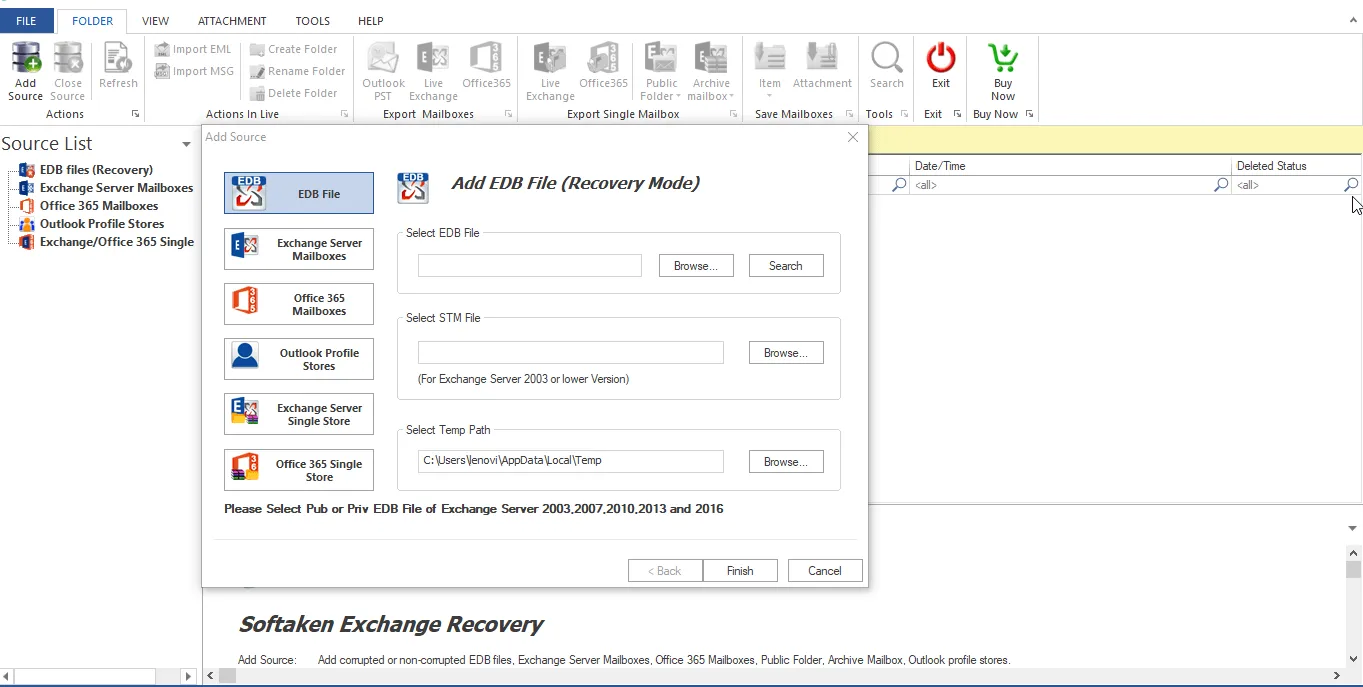
Add EDB File Browse and choose the disconnected or Offline EDB file.
Preview Data: Preview all mailbox folders and items in depth in the interface.
Specific mailboxes Select the mailboxes or folders you want to export.
Choose Output Format: Select PST as your saving format.
Convert & Save: Select the target folder and click on the Export button to start the safe conversion.
In-depth Comparison: Manual Methods vs. WholeClear
Here is a full, point-by-point comparison of the two methodologies to better appreciate the differences:
Exchange PowerShell: Manual Methods in Detail
Exchange Server Dependence: This technique is largely dependent on having a live, healthy Exchange Server infrastructure. If the server is crashed or down you can't export manually.
No Support for Offline Files: PowerShell cannot directly open or read .edb files which are offline and unconnected or orphaned on a local drive.
Prone To Corruption: In case of any corruption, even minor, in the EDB file, manual instructions will not be able to process it and there is a chance of losing data completely.
High Technical Curve: Needs to write complicated scripts in the Exchange Management Shell. One syntax error, one wrong permission setting and the whole process is stopped.
Inefficient filtering: Batch exports and selective data recovery (such as exporting only a specified folder or date range) is incredibly complex and tedious to configure manually.
WholeClear EDB to PST Converter: A Comprehensive Review
No Server Dependency: This software is entirely self-contained. No need to have Microsoft Exchange Server installed, operating or online.
Direct Offline Access : It can directly load and scan any orphaned or disconnected EDB file from any storage media.
Advanced Recovery Engine: The utility has sophisticated scanning algorithm which automatically repairs badly corrupted or damaged EDB databases before extracting data.
User Friendly Interface: This is built with a simple Graphical User Interface (GUI), no PowerShell commands are needed. Any non-technical person can export in only a few clicks.
Smooth Batch & Selective Export: Users can view entire preview of the database items easily, inspect specific folders or mailboxes individually & convert many huge mailboxes at one go.
Complete Data Integrity: The program ensures 100% preservation of original folder structure, email formatting, attachments and metadata (To, CC, BCC, timestamps).
Best Practices Before Converting EDB to PST
- To make the converting process smooth and error free, here are some tips:
- Always take backup copy of original EDB file before processing.
- Make sure that the destination drive has enough disk space to accommodate the new PST files.
- Close any resource-heavy applications to speed up the conversion.
- Do not interrupt the software during the extraction process.
Conclusion.
Exporting disconnected EDB mailboxes to PST can be tricky especially when Exchange Server is unavailable or the database is corrupted. There are manual PowerShell techniques but their extensive dependencies and technological hazards make it impracticable for essential data recovery.
An automated solution like WholeClear EDB to PST Converter makes the whole operation easy. Independent of Exchange Server, it supports corrupted files and maintains original data integrity to provide organizations and administrators with a fast, secure and hassle-free mailbox recovery experience.
Tags : .....