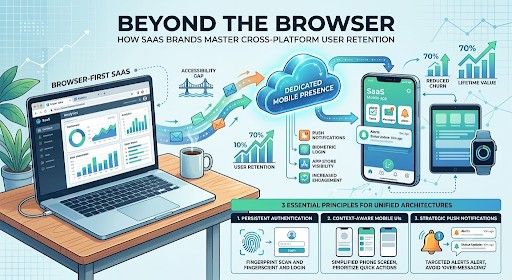
Over the past decade, Software-as-a-Service (SaaS) platforms built their empires primarily within the web browser. The standard operational playbook was straightforward: design a responsive web application, optimize the desktop dashboard, and serve users while they sat at their desks. For years, that browser-first model was more than sufficient to drive strong recurring revenue and steady customer acquisition.
However, shifting user behaviors have permanently altered how professionals and consumers interact with software. Modern teams expect continuous connectivity, instant status updates, and seamless transition between office workstations and mobile environments. When an operational tool, customer portal, or workflow platform is restricted exclusively to a desktop browser tab, user engagement naturally drops the moment a subscriber steps away from their desk. Bridging this accessibility gap has quickly evolved from a product luxury into a core retention requirement.
The Rising Cost of Mobile Friction in Cloud Software
User retention in the SaaS industry hinges on habits. Software that embeds itself into an end-user’s daily routine yields high lifetime value and low churn. Conversely, software that requires deliberate, manual effort to access via a mobile browser window frequently gets forgotten.
Mobile browser sessions present inherent friction points that degrade user experience. Mobile web browsers regularly clear session tokens, force repetitive logins, struggle with complex drag-and-drop interfaces, and lack persistent background connectivity. More importantly, web applications running inside standard mobile browsers cannot deliver native system push notifications—the primary mechanism modern platforms rely on to re-engage passive users, deliver time-sensitive alerts, and maintain daily active usage metrics.
When software providers fail to offer a dedicated, easily accessible mobile presence, users seek alternative tools that accommodate their on-the-go schedules. This subtle drop in daily engagement quietly accelerates account churn, as key decision-makers begin questioning subscription renewals for software their teams only use intermittently.
Evaluating the Build vs. Convert Strategy for Mobile Expansion
Recognizing the need for a mobile presence is simple; executing it efficiently without exhausting product resources is much more challenging. Traditionally, SaaS companies faced a daunting trade-off: spend months of engineering bandwidth and tens of thousands of dollars developing separate iOS and Android native apps, or leave their mobile users with a clunky mobile web interface.
For startups and scaling enterprises alike, dedicating scarce engineering resources to building native code bases from scratch often diverts focus away from core product innovation. Maintaining three distinct code bases—web, iOS, and Android—demands continuous synchronization, tripling QA testing overhead and slowing down feature deployment schedules across the entire organization.
To overcome these resource constraints, agile engineering teams increasingly seek streamlined alternatives that extend existing web investments directly to mobile app stores. Utilizing a reliable website to app converter enables companies to wrap their existing, highly responsive web platforms into native iOS and Android packages without rebuilding backend logic from scratch. This hybrid approach preserves unified codebase maintenance while immediately unlocking essential mobile capabilities, including app store visibility, biometric login access, background data sync, and targeted push notification channels.
Essential Principles for Unified Multi-Device Architectures
Successfully expanding a SaaS ecosystem across desktop and mobile requires more than just publishing an app package to digital storefronts. Product leaders must design their overall software architecture to support fluid, multi-device user journeys.
1. Persistent Authentication and Session Security
Mobile users expect friction-free access. Forcing users to enter complex enterprise passwords every time they open an application on a phone leads to immediate drop-offs. Implementing OAuth protocols, persistent session tokens, and native biometric security (such as Face ID or fingerprint scanning) ensures secure, frictionless entry while maintaining enterprise compliance standards.
2. Context-Aware Mobile User Interfaces
A desktop interface designed for dual 27-inch monitors rarely translates directly to a 6-inch touchscreen. When optimizing web software for mobile delivery, simplify navigation menus, prioritize high-frequency actions, and reduce visual clutter. Mobile interfaces should focus on quick status checks, approvals, messaging, and real-time alerts, reserving deep analytical tasks for desktop environments.
3. Strategic Push Notification Governance
Push notifications are a double-edged sword. When used strategically, contextual notifications drive incredible retention gains by alerting users to urgent updates, workflow approvals, or completed data processing. However, over-messaging users with low-value promotional alerts quickly leads to notification muting or app uninstalls. Establish clear notification tiers so users receive only high-value, actionable alerts on their mobile devices.
The Future of Hybrid Cloud Software
The line separating web software from mobile applications is blurring rapidly. Users no longer distinguish between web apps, desktop tools, and mobile software—they simply view a product as a single digital service that should be accessible whenever and wherever they need it.
SaaS organizations that adapt to this multi-touchpoint reality will secure a significant competitive advantage. By maintaining lean development workflows, prioritizing cross-platform accessibility, and eliminating mobile friction, forward-thinking software brands can deepen user engagement, protect recurring subscription revenues, and build resilient products designed for long-term growth.
Tags : Cloud Software